

What Bug Bounty Really Looks Like for Beginners in 2026
Every beginner hears the same advice: "Buy Burp Pro." "Get CEH first." "Learn programming for years before you even try."
The truth? Most first valid reports are found with free tools, basic web knowledge, and a repeatable process — not expensive software.
This guide breaks down exactly what to learn, what to ignore, and how to start legally and realistically in 2026.
Ethical & Legal Disclaimer
Important note: This guide focuses only on legal bug bounty programs, intentionally vulnerable labs, and ethical testing. Never test websites without permission.
Bug Bounty Roadmap for Beginners: A Practical 14-Day Plan
Days 1–3: Building Your Foundation
What to Learn First for Bug Bounty (And What to Ignore)
Forget the 100-hour courses. You don't need a computer science degree. Focus on these essentials:
- How Websites Work: Core Knowledge for Bug Bounty Beginners
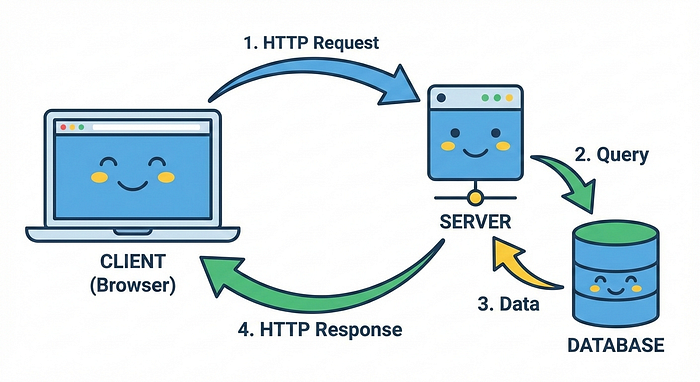
Think of a website like a restaurant:
- Client (Your Browser): The customer ordering food
- Server: The kitchen cooking and serving food
- HTTP: The language used to take orders and deliver meals
- Database: The pantry storing all ingredients
When you visit Facebook.com, your browser (client) sends an HTTP request to Facebook's server saying "Give me the homepage." The server grabs data from its database and sends it back.
Simple Example:
YOU: "Hey Facebook, show me my profile"
FACEBOOK SERVER: "Okay, let me check who you are..."
(Server looks in database)
FACEBOOK SERVER: "Here's your profile page with your posts!"
2. Basic HTML and JavaScript Skills for Bug Bounty Hunting
You don't need to build websites. You need to read code. Spend 2–3 hours on these free resources:
- HTML: Understand tags like
<form>,<input>,<script> - JavaScript: Know what variables, functions, and events are
Why this matters: Security bugs often hide in JavaScript files. You need to spot suspicious code.
3. HTTP Methods and Status Codes Explained for Bug Bounty
Simple breakdown:
- GET: "Give me data" (viewing a page)
- POST: "Save this data" (submitting a form)
- PUT: "Update this data"
- DELETE: "Remove this data"
Status codes:
- 200: Success
- 404: Not found
- 403: Forbidden (you don't have access)
- 500: Server error (something broke)
Real Example:
When you log into Instagram:
1. You click "Login" (sends POST request with username/password)
2. Server checks if correct (looks in database)
3. If correct: Returns 200 + login cookie
4. If wrong: Returns 401 (Unauthorized)
Free Bug Bounty Tools You Need to Start in 2026
Best Linux Operating Systems for Bug Bounty Beginners
Why Linux? All professional security tools work better on Linux.
Best options:
- Kali Linux (everything pre-installed Recommended) — kali.org
- Parrot OS (lightweight alternative) — parrotsec.org
- Ubuntu (if you want to install tools yourself) — ubuntu.com
Don't have a spare computer? Install VirtualBox (free) and run Linux as a virtual machine inside Windows/Mac.
Essential Free Tools for Bug Bounty Hunting:
Burp Suite Community (Intercept web traffic) Firefox (Browser for testing) Sublime Text / VS Code: (Read code files) Terminal (Run commands)
Installation (Ubuntu/Kali):
# Update system
sudo apt update && sudo apt upgrade -y

# Install essential tools
sudo apt install -y firefox burpsuite git curl wget python3 python3-pip

# Install Go (needed for many security tools)
wget https://go.dev/dl/go1.21.5.linux-amd64.tar.gz
sudo tar -C /usr/local -xzf go1.21.5.linux-amd64.tar.gz
echo 'export PATH=$PATH:/usr/local/go/bin' >> ~/.bashrc
source ~/.bashrc
"Bug bounty success is not about hacking harder — it's about testing what others ignore."
Days 4–5: Common Bug Bounty Vulnerabilities Every Beginner Should Know
You'll focus on the OWASP Top 10 — the most common security bugs. But instead of reading boring definitions, let's use simple examples.
1. Broken Access Control (IDOR): A High-Impact Bug Bounty Vulnerability
Simple explanation: Viewing or changing data that doesn't belong to you.
Real-world example:
Normal: https://bank.com/account?user_id=12345
(Shows YOUR bank account)

Bug: https://bank.com/account?user_id=12346
(Shows SOMEONE ELSE'S account!)
The website forgot to check "Does this person own account 12346?" before showing it.
How to test:
- Log into website with Account A
- Note your user_id (let's say 100)
- Change URL to user_id=101, 102, 103…
- If you see someone else's data → IDOR bug!
2. Cross-Site Scripting (XSS): How Beginners Find Their First Bugs
Simple explanation: Injecting your own code into someone else's website.
Real-world example:
Imagine a comment box on Facebook. You type:
<script>alert('Hacked!')</script>If Facebook doesn't check this properly, everyone who views the page will see an alert box pop up!
Why this matters: Hackers can steal cookies, redirect users, or deface websites.
How to test:
Find any input field (search box, comment section, profile name):
Test payloads:
<script>alert(1)</script>
<img src=x onerror=alert(1)>
"><script>alert(1)</script>
If an alert box pops up → XSS vulnerability!
3. Sensitive Data Exposure: A Common Beginner Bug Bounty Finding
Simple explanation: Private information displayed when it shouldn't be.
Real-world example:
You register on website: email@example.com, password: secret123
Website returns response:
{
  "status": "success",
  "user_id": 500,
  "email": "email@example.com",
  "password": "secret123"  ← EXPOSED!
}
Passwords should NEVER be sent back, even encrypted!
4. Security Misconfiguration: Issues in Bug Bounty Programs
Simple explanation: Default settings left unchanged, exposing the system.
Real-world examples:
/adminpanel accessible without login- Error messages revealing server details
- Directory listing enabled (you can browse all files)
How to test:
Try accessing:
https://target.com/admin
https://target.com/administrator
https://target.com/wp-admin
https://target.com/.git
https://target.com/.env
Days 6–7: Safe Bug Bounty Practice Platforms for Beginners
DO NOT test on random websites! That's illegal. Use intentionally vulnerable apps:
Free Practice Platforms:
- PortSwigger Web Security Academy (Best for beginners)
- URL: portswigger.net/web-security
- Labs for each vulnerability type
- Completely free, no credit card
- DVWA (Damn Vulnerable Web Application)
- Download and run locally
- Adjust difficulty: low, medium, high
- Perfect for hands-on practice
- OWASP Juice Shop
- Modern web app with 100+ vulnerabilities
- Gamified challenges with hints
- Great for learning
Your Practice Routine:
- Morning (1 hour): Complete 2–3 PortSwigger labs
- Evening (1 hour): Try finding bugs in DVWA
Example: XSS Practice
- Go to DVWA XSS page
- Try simple payload:
<script>alert(1)</script> - If blocked, try variations:
<ScRiPt>alert(1)</ScRiPt>(case change)<img src=x onerror=alert(1)>(different tag)"><script>alert(1)</script>(close existing quote)
- Once it works, understand WHY it works
""Bug bounty rewards patience, not speed."
Days 8–10:How to Choose Your First Bug Bounty Program
This is where most beginners fail. They pick Google, Facebook, or GitHub — programs with thousands of experienced hunters.
How to Select Beginner-Friendly Bug Bounty Programs
Look for programs with:
✅ Low Resolved Reports: < 500 reports resolved ✅ Good Response Time: < 7 days average ✅ Clear Scope: Specific domains and rules ✅ Beginner-Friendly Tag: Some programs label themselves this way ✅ Recent Activity: Programs still actively triaging
Avoid programs with:
❌ High Competition: 1000+ researchers registered ❌ Vague Scope: "Test anything on our domain." ❌ Slow Response: 30+ days to first response ❌ Low Bounties for High Severity: $50 for Critical bugs
Where to Find Programs
HackerOne
- Sign up for free at hackerone.com
- Go to "Directory" → Filter by "Resolved reports: < 500."
- Look for the "Accepts applications" tag
Bugcrowd
- Sign up for free at bugcrowd.com
- Browse "Programs" → Sort by "Launch Date" (newest first)
- Check the "Response efficiency" metric
Intigriti (My Favorite)
- Sign up for free at intigriti.com
- Filter programs by "Beginner-friendly."
YesWeHack
- Sign up for free at yeswehack.com
- Check the "Public programs" section
Example: Perfect Beginner Program
Program: Small E-commerce Company
Resolved Reports: 150
Registered Researchers: 80
Response Time: 3 days
Minimum Bounty: $100
Scope: *.company.com, company.com, api.company.com
Why this is perfect:
- Low competition (80 researchers vs 5000+ on popular programs)
- Fast response (you'll know if your report is valid quickly)
- Clear scope (you know exactly what to test)
- Decent payment (even low bugs pay something)
Days 11–12: Reconnaissance — The Most Important Bug Bounty Skill
Most beginners skip this and jump straight to testing. Big mistake.
What Is Reconnaissance in Bug Bounty?
Think of it like being a detective before robbing a bank (legally, of course!). You need to know:
- How many doors and windows exist? (Subdomains)
- What security systems are in place? (Technologies used)
- Where do people enter and exit? (Entry points / forms)
- What valuables are inside? (Sensitive endpoints)
Free Reconnaissance Tools Used in Bug Bounty Hunting
1. Subfinder (Find Hidden Subdomains)
Subdomains are like branches of a main website:
Main site: company.com
Subdomains:
  - admin.company.com (admin panel)
  - api.company.com (API endpoints)
  - old.company.com (forgotten old version - often vulnerable!)
  - dev.company.com (development version - less secure!)
Install:
go install -v github.com/projectdiscovery/subfinder/v2/cmd/subfinder@latestUse:
subfinder -d target.com -o subdomains.txtReal Example:
$ subfinder -d example.com

admin.example.com
api.example.com
blog.example.com
dev.example.com      ← Interesting! Dev environments are often less secure
mail.example.com
old.example.com      ← Very interesting! Old versions may have unpatched bugs
staging.example.com  ← Perfect! Staging sites often mirror production with weaker security
2. httpx (Check Which Subdomains Are Live)
Not all subdomains are active. httpx checks which ones actually work:
Install:
go install -v github.com/projectdiscovery/httpx/cmd/httpx@latestUse:
cat subdomains.txt | httpx -o live_hosts.txtWhat you'll see:
$ cat subdomains.txt | httpx

https://admin.example.com [200]      ← Active (200 = working)
https://api.example.com [200]        ← Active
https://blog.example.com [404]       ← Not found
https://dev.example.com [403]        ← Forbidden (exists but you can't access)
https://old.example.com [200]        ← Active (interesting!)
3. waybackurls (Find Old Pages)
Wayback Machine archives old versions of websites. Sometimes developers remove pages from the live site but forget they're still accessible:
Install:
go install github.com/tomnomnom/waybackurls@latestUse:
echo "example.com" | waybackurls > wayback_urls.txtWhy this matters:
You might find:
https://example.com/old-admin-panel
https://example.com/backup/database.sql
https://example.com/test.php
https://example.com/api/v1/users (old API version)
These could still work even though they're not linked anywhere!
4. Burp Suite (Your Main Testing Tool)
Burp Suite is like a middleman between your browser and the website. It captures EVERYTHING:
- Every request you make
- Every response the server sends
- Hidden form fields
- Cookies
- API calls
How to use Burp Suite:
- Open Burp Suite Community Edition
- Go to "Proxy" → "Intercept is off" (turn it ON)
- Configure Firefox to use Burp's proxy:
- Settings → Network Settings
- Manual proxy: localhost, Port 8080
- Visit target website
- All traffic now appears in Burp!
Simple Example:
You log into website with:
Username: testuser
Password: testpass
Burp captures the request:
POST /login HTTP/1.1
Host: target.com
Content-Type: application/x-www-form-urlencoded

username=testuser&password=testpass
Now you can modify this! Try:
username=admin&password=testpass
username=testuser' OR '1'='1&password=anything
user_id=100&username=testuser&password=testpass
Your Recon Checklist (Day 11–12)
For your chosen program, complete this:
# Step 1: Find all subdomains
subfinder -d target.com -o subdomains.txt

# Step 2: Find which are live
cat subdomains.txt | httpx -o live.txt

# Step 3: Find old URLs
echo "target.com" | waybackurls > urls.txt

# Step 4: Browse the site with Burp running

# - Click every link
# - Fill every form
# - Test every feature
# - Capture everything in Burp
# Step 5: Take notes
# Create a file: notes.txt
# Write down:
# - Login pages found
# - Admin panels
# - API endpoints
# - Interesting parameters (?id=, ?user=, ?page=)
# - Technologies used (WordPress, PHP, Python)Days 13–14: How to Find Your First Bug Bounty Vulnerability
Time to hunt! Focus on these high-probability vulnerabilities for beginners:
1. IDOR (Broken Access Control)
Where to test: Anywhere with user IDs or object IDs
Step-by-step:
- Create two accounts (user1 and user2)
- Log in as user1
- Find your profile URL:
https://site.com/profile?id=123 - Log in as user2
- Change URL to user1's ID:
https://site.com/profile?id=123 - Can you see user1's profile? → IDOR!
Real-world example:
# As user 100

GET /api/messages?user_id=100

Response:
{
  "messages": [
    {"id": 1, "text": "Hello!"},
    {"id": 2, "text": "How are you?"}
  ]
}

# Try changing user_id

GET /api/messages?user_id=101

# If you see user 101's messages → BUG!
2. Open Redirect
Where to test: Login pages, logout pages, any page with redirect= or url= parameter
Example:
Normal URL:
https://site.com/login?redirect=/dashboard

Test:
https://site.com/login?redirect=https://evil.com

After login:
- If it redirects you to evil.com → Open Redirect bug!
Why this matters: Attackers use this for phishing. They send victims:
https://legitbank.com/login?redirect=https://fake-bank.comVictim logs in on real site, then gets redirected to fake site where attacker steals credentials.
3. Sensitive Data Exposure
Where to test: API responses, error messages, source code
Method 1: Check API responses
Create account and watch the response in Burp:
{
  "status": "success",
  "user": {
    "id": 500,
    "name": "John",
    "email": "john@example.com",
    "password": "hashed_password_here"  ← Should NOT be here!
  }
}
Even hashed passwords shouldn't be sent to client!
Method 2: Check JavaScript files
# Find all JS files
cat live.txt | httpx -path /js/ -mc 200

# Look through them for:
- API keys: "api_key": "sk_live_abc123..."
- Internal endpoints: "/admin/secret-panel"
- Passwords: "default_password": "admin123"
4. Missing Rate Limiting
Where to test: Login, password reset, SMS verification
Method:
Send same request 100 times. If it always works → No rate limiting!
Example with Burp Intruder:
- Capture login request in Burp
- Send to Intruder (Ctrl+I)
- Clear all markers
- Set attack type: "Sniper"
- Set payload: Numbers 1–100
- Start attack
- If all 100 attempts work → Rate limiting missing!
Why this matters:
- Password brute-forcing becomes possible
- SMS flooding (attacker sends 1000 SMS codes)
- Resource exhaustion
5. Information Disclosure
What to look for:
# Try these URLs:
/robots.txt           (Might reveal admin paths)
/.git                 (Exposed git repository)
/.env                 (Environment variables with passwords)
/backup.zip           (Database backups)
/.DS_Store            (Mac system file revealing structure)
/phpinfo.php          (PHP configuration details)
Real example:
$ curl https://target.com/.env

DB_HOST=localhost
DB_USER=root
DB_PASS=SuperSecret123!  ← DATABASE PASSWORD EXPOSED!
AWS_KEY=AKIAIXEXAMPLE
AWS_SECRET=wJalrXExample  ← AWS CREDENTIALS EXPOSED!
This is a CRITICAL bug!
"Every duplicate report is proof you're looking in the right direction."
How to Write Your First Bug Bounty Report (With Example)
You found a bug! Now what? A bad report gets rejected. A good report gets accepted and paid.
The Perfect Report Structure
**Title:** IDOR Allows Any User to View Other Users' Private Messages

**Severity:** High


**Description:**
The /api/messages endpoint does not properly verify user ownership,
allowing any authenticated user to view private messages of other
users by changing the user_id parameter.

**Steps to Reproduce:**
1. Create two accounts:
   - user1@email.com (user_id=100)
   - user2@email.com (user_id=101)
2. Log in as user1 and send a private message:
   POST /api/messages
   Body: {"to": 102, "text": "This is user1's private message"}
3. Log in as user2 and make the following request:
   GET /api/messages?user_id=100
4. Observe that user2 can see user1's private messages


**Proof of Concept:**

Request:
GET /api/messages?user_id=100 HTTP/1.1
Host: target.com
Cookie: session=user2_session_token
Response:
{
  "messages": [
    {
      "id": 1,
      "text": "This is user1's private message",
      "from": 100,
      "to": 102
    }
  ]
}


**Impact:**

- Any user can read any other user's private messages
- Affects all X users of the platform
- Violates privacy and could expose sensitive information
**Suggested Fix:**
Add server-side validation:
- Verify that the requested user_id matches the authenticated user
- Example: if (req.user.id !== req.query.user_id) return 403;


**Attachments:**
[Screenshot showing user2 viewing user1's messages]
[Video demonstration if available]
Common Bug Bounty Report Writing Mistakes Beginners Should Avoid
❌ Vague descriptions: "I found XSS" ✅ Be specific: "Stored XSS in profile name field allows attackers to steal session cookies"
❌ No steps to reproduce: "There's an IDOR on the site" ✅ Clear steps: "1. Do this, 2. Then this, 3. Observe result"
❌ Overstating impact: "This could destroy the entire company!" ✅ Realistic impact: "This allows unauthorized access to user messages"
❌ Testing on production users: "I accessed user #500's account" ✅ Use test accounts: "I created two test accounts to demonstrate"
Complete Free Bug Bounty Tool Stack for Beginners
Here's everything you need, all free:
Reconnaissance Tools
# Subdomain enumeration
go install github.com/projectdiscovery/subfinder/v2/cmd/subfinder@latest
go install github.com/tomnomnom/assetfinder@latest

# HTTP probing
go install github.com/projectdiscovery/httpx/cmd/httpx@latest
# URL collection
go install github.com/tomnomnom/waybackurls@latest
go install github.com/lc/gau/v2/cmd/gau@latest
# Content discovery
go install github.com/ffuf/ffuf/v2@latest
Testing Tools
# Burp Suite Community (Download from portswigger.net)
# OWASP ZAP (Alternative to Burp)
sudo apt install zaproxy

# SQLMap (SQL injection testing)
sudo apt install sqlmap
Utility Tools
# jq (Parse JSON responses)
sudo apt install jq

# curl (Make HTTP requests)
sudo apt install curl
# grep, sed, awk (Text processing - usually pre-installed)
Wordlists (For fuzzing)
git clone https://github.com/danielmiessler/SecLists.gitThe first time I submitted a report, I was confident. It came back marked out of scope in less than an hour.
That rejection didn't mean I was bad — it meant I was finally testing real systems
Realistic Bug Bounty Timeline for Beginners
Let's be honest about what your first 14 days look like:
Day 1–3: Excited! Learning feels fun. Day 4–7: Overwhelmed. "There's so much to learn!" Day 8–10: Choosing targets. Feeling intimidated. Day 11–12: Reconnaissance. "I found 50 subdomains!" Day 13: First testing attempts. Everything seems secure. Day 14: Still testing. Maybe found something small.
Week 3–4: First report submission. Marked as duplicate. Week 5–6: Another duplicate. Feeling discouraged. Week 7–8: Valid bug! But it's informational (no bounty). Week 9–10: Low severity bug accepted. $50–100 reward!
This is NORMAL. Every successful hunter went through this.
Common Beginner Mistakes (And How to Avoid Them)
Mistake #1: Testing Without Reading the Scope
Example:
Program scope: *.company.com, company.com
You test: company.org, old-company.com, partner-site.com
Result: Report rejected as "out of scope"
Fix: Read the scope carefully. If unsure, ask the program!
Mistake #2: Using Automated Scanners Blindly
What beginners do:
sqlmap -u "https://target.com/page?id=1" --batch --dbsThen report everything SQLmap finds.
Why this fails:
- Everyone else already ran SQLmap
- It's probably a duplicate
- Automated tool findings are lowest priority
Better approach:
Use tools for recon, test manually for bugs.
Mistake #3: Not Checking for Duplicates
Before spending hours on a bug, check:
- Does this exact issue exist in disclosed reports?
- Has someone reported this endpoint before?
- Is this a known issue in this technology?
How to check:
- Search program's disclosed reports on HackerOne/Bugcrowd
- Google: "site:hackerone.com [program name] IDOR"
- Check program's FAQ
Mistake #4: Giving Up Too Early
Most beginners quit after:
- Their first duplicate
- Their first "not applicable"
- Their first "informational" (no bounty)
Reality: Top hunters had hundreds of duplicates before their first big find.
Mindset shift:
- Each duplicate = Learning what's already found
- Each rejection = Understanding what matters
- Each informational = Building reputation
What to Do After Your First Bug Bounty Report
You've completed the 14 days. What next?
Week 3–4: Consistency
Pick ONE program. Spend 2–3 hours daily:
- Monday: Recon (find new subdomains, endpoints)
- Tuesday: Manual testing (focus on IDOR)
- Wednesday: Manual testing (focus on XSS)
- Thursday: API testing
- Friday: Review and report writing
- Weekend: Learning (read 10 disclosed reports)
Week 5–8: Pattern Recognition
You'll start noticing patterns:
- "This site uses the same framework as one I tested before"
- "User IDs are always sequential"
- "API endpoints follow this naming structure"
This is when hunting gets faster.
Month 3–6: First Consistent Earnings
By month 3, you should:
- Have submitted 10–20 reports
- Have 2–5 valid findings (even if low severity)
- Know your favorite vulnerability types
- Understand your selected programs deeply
Free Bug Bounty Learning Resources for Beginners
Websites
PortSwigger Web Security Academy
- portswigger.net/web-security
- Best free resource, period
OWASP Top 10
- owasp.org/www-project-top-ten
- Understand the most common vulns
HackerOne Hacktivity
- hackerone.com/hacktivity
- Read disclosed reports daily
YouTube Channels
- InsiderPhD — Beginner-friendly explanations
- NahamSec — Live hacking sessions
- STÖK — Creative testing methods
- PwnFunction — Animated vulnerability explanations
Communities
- r/bugbounty
- r/netsec
- Discord
- NahamSec Community
- Bug Bounty Forum
- Twitter/X
- Follow: @NahamSec, @stokfredrik, Katie Paxton-Fear
The Honest Truth About Bug Bounty
It's Not a Get-Rich-Quick Scheme
According to 2026 data:
- Beginners earn $0–500 in their first 3 months
- Intermediate hunters make $500–2,000/month
- Full-timers average $3,000–8,000/month
- Top 1% earn $100,000+ annually
It Requires Real Skill
You're competing against:
- People with computer science degrees
- Former penetration testers
- Self-taught hackers with 5+ years experience
But everyone started at zero.
It Rewards Persistence
The difference between successful hunters and those who quit?
Successful hunters submitted 50 reports before their first $1,000 bug. Those who quit submitted 5 reports and gave up.
Your 14-Day Checklist
Print this out and check off each day:
□ Day 1: Understand HTTP, HTML, JavaScript basics
□ Day 2: Set up Linux (Kali/Ubuntu/Parrot)
□ Day 3: Install Burp Suite, Firefox, basic tools
□ Day 4: Learn IDOR concept + practice on DVWA
□ Day 5: Learn XSS concept + practice on DVWA
□ Day 6: Complete 5 PortSwigger labs
□ Day 7: Complete 5 more PortSwigger labs
□ Day 8: Browse HackerOne, find 3 beginner programs
□ Day 9: Research chosen programs (scope, rules)
□ Day 10: Read 10 disclosed reports from similar programs
□ Day 11: Run reconnaissance (subfinder, httpx, waybackurls)
□ Day 12: Map attack surface, identify interesting endpoints
□ Day 13: Manual testing - focus on IDOR and access control
□ Day 14: Manual testing - focus on XSS and data exposure
□ Day 15: Write and submit your first report
Final Thoughts: Is Bug Bounty Worth It in 2026?
Bug bounty hunting in 2026 is harder than ever. But it's also more accessible than ever.
You don't need:
- Expensive certifications
- Paid tools
- Computer science degree
- Years of experience
You DO need:
- Clear methodology (this guide)
- Consistent effort (2–3 hours daily)
- Willingness to fail (duplicates are learning)
- Patience (first bounty takes time)
The tools are free. The knowledge is free. The opportunity is real.
If this guide helped you, follow me on Medium. I publish real bug bounty case studies, rejected reports, and lessons learned — not theory.
Transparency Note
This article was created through research from bug bounty platforms (HackerOne, Bugcrowd, Intigriti), GitHub repositories of security tools, official documentation, and community discussions on Reddit and Twitter. All tools mentioned are open-source and free. Timelines and expectations are based on documented experiences from the bug bounty community, not fabricated success stories. If you find any outdated information or have corrections, please comment below — this is a living guide that improves with community feedback.
Related Tags: #BugBounty #CyberSecurity #EthicalHacking #InfoSec #PenetrationTesting #BugBountyHunting #WebSecurity #OWASP #SecurityResearch #HackerOne