


Improve your bug bounty hunting, pentesting, and appsec skills with the JS Link Finder Burp Suite Extension. Discover hidden endpoints and test for vulnerabilities such as authentication bypass, broken access control, XSS, and SQLi.
Why JS Link Finder?
It's simple. This tool scans JavaScript files to uncover hidden endpoints and parameters that could be your ticket to discovering unauthenticated access points, broken access control vulnerabilities, and even injections. 🚀
Getting Started: Installing JS Link Finder
First things first, let's get this bad boy installed.
- Open Burp Suite: Fire up Burp Suite. (Duh! 😜)
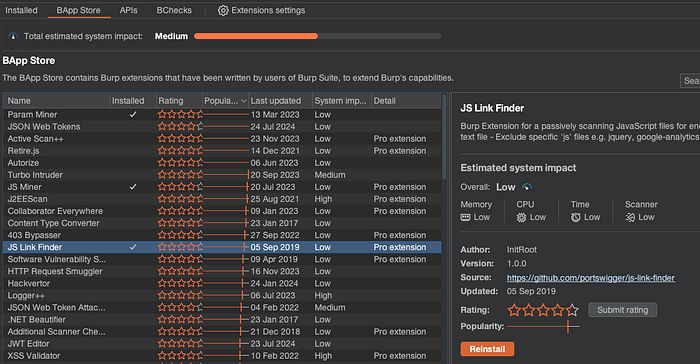
- Navigate to BApp Store: Head over to the Extender tab and hit the BApp Store.
- Search & Install: Look for "JS Link Finder" and smash that install button. Done and dusted! 🛠️
Walking the Site: Scouting for Gold
Now that we've got JS Link Finder locked and loaded, it's time to manually walk through the site to gather those JS files.
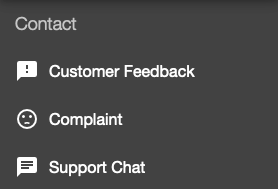
- Browse the Site: Start by manually browsing through the site. Visit every page, click on every link, and interact with all the features. This ensures you're loading all possible JS files.
- Monitor Requests: Keep an eye on the Proxy tab in Burp Suite. Every JS file that gets loaded will show up here. Make sure to visit sections of the site that might load additional scripts.
- Collect Data: As you walk through the site, JS Link Finder will automatically analyze the JS files being loaded and populate its list of discovered links.
Reviewing Findings: Digging for Diamonds
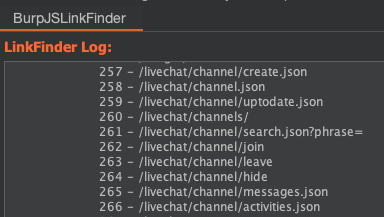
Once the logging is done, head over to the JS Link Finder tab to review the goldmine of links it found.
- Analyze: Carefully check the URLs and parameters. This is where your hacker instincts come into play. Find anything interesting? Note it down! 🕵️♂️
Authentication Bypass Testing
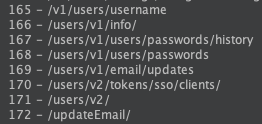
With your list of potential endpoints, it's time to see if you can waltz right in.
- Authentication Bypass: Make sure you're fully logged out and open the links in your browser? Do any sensitive links work, expose sensitive data, or allow you to execute actions?
Business Access Control (BAC) Testing
Let's see if we can find broken access control.
- Create Accounts: Have both admin and regular user accounts ready. 🛠️
- Capture Cookies: Copy the session cookie from the regular user account. 🍪
- Admin Endpoints: Use the endpoints discovered with JS Link Finder to identify admin actions and capture these requests. 🔒
- Burp Repeater: Send the admin action request to Burp Repeater. 📡
- Swap Cookies: Replace the admin session cookie with the regular user's cookie. 🔄
- Test for BAC: Send the modified request and check if the action succeeds. ✅
XSS and SQL Injections: Let's Get Exploity
No pen-test is complete without checking for injections.
SQL Injection (SQLi):
- Manual Testing: Insert SQL payloads into the parameters and observe the responses. Look for database errors or unexpected behavior.
'
"
' OR 1=1 --
" or 1=1 --- Automated Testing: If you see SQL error messages or the payloads above change the response in any way, try sqlmap to automate the SQLi discovery process. Always double-check results manually to ensure accuracy. 🤖
Cross-Site Scripting (XSS):
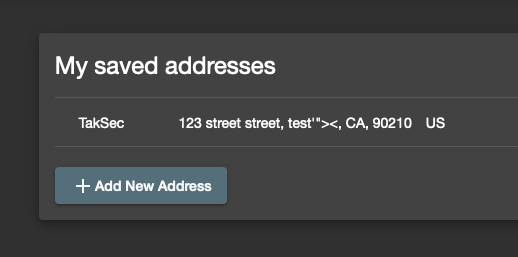
- Manual Testing: Inject common XSS payloads into the parameters. Start with the top payload and work your way down. If payload #3 causes an alert pop-up and you have a method of theoretically getting another user to see the pop-up, this proves XSS which allows arbitrary javascript.
'"><
'"><b>XSS</b>
'"><img src=XSS onerror=alert(document.domain)>
Stay sharp and thorough, and you'll uncover those hidden injection points in no time!
Wrap-Up: You're a Rockstar!
You did it! 🎉 You installed JS Link Finder, crawled the site, reviewed findings, and tested for vulnerabilities. Each step brings you closer to being a pen-testing rockstar. Remember, practice makes perfect, and tools like JS Link Finder make the journey a lot smoother.
Resources:
Follow me on Twitter for daily hacking tips:
Happy hunting!