


Introduction
Hi everyone, welcome back! Today, I'm going to show you the exact method I use to find bugs on almost any website in under five minutes. I'll show you exactly how I do it. I use a really fast shortcut that combines a few clever tricks to quickly understand a website and then I let automated tools do the hard work of scanning for bugs. It's all about working smart, not hard, so you can find the most important vulnerabilities without wasting any time.
In this walkthrough, I'll cover:
- How I use Shodan to quickly identify mass-scale CVE exposures.
- Scripts that uncover hidden inputs, forms and URLs.
- Automation workflows with Nuclei, GF patterns, Uro and other tools.
- Recon techniques with WaybakURLs, AlienVault, URLScan, VirusTotal and more.
- My own custom scripts like Lost Uncover and LostFuzzer to streamline scanning.
Method 1: Mass Scanning with Shodan & Nuclei
This is my go-to method for finding recently disclosed CVEs at a massive scale. It's incredibly efficient for identifying low-hanging fruit across thousands of targets.
- Find Your Target CVE: First, pick a CVE you want to hunt for. For this example, let's say we're looking for a specific vulnerability in a popular software.
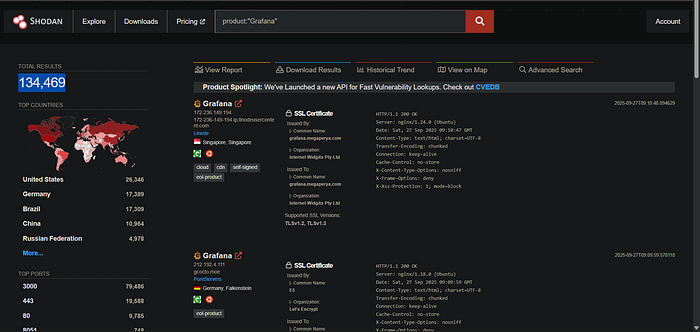
- Shodan Dorking: Head over to Shodan and use a specific search dork related to the product or CVE. Shodan will instantly show you all the internet-connected devices matching your query.
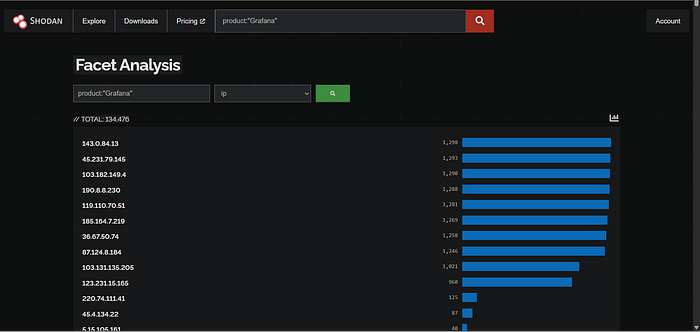
3. Facet Analysis for IPs: On the results page, click the "More" option to open the Facet Analysis tab. From there, select the "ip" option. This neatly organizes all the results by their IP address.
4. Extract and Scan: Now for the magic. I use a custom bookmarklet I wrote that automatically fetches all the IP addresses from the Shodan results and downloads them as a .txt file. Here is the that bookmarklet script.
for ip's:
javascript:(function(){var ipElements=document.querySelectorAll('strong');var ips=[];ipElements.forEach(function(e){ips.push(e.innerHTML.replace(/["']/g,''))});var ipsString=ips.join('\n');var a=document.createElement('a');a.href='data:text/plain;charset=utf-8,'+encodeURIComponent(ipsString);a.download='ip.txt';document.body.appendChild(a);a.click();})();for domains:
javascript:(function(){var ipElements=document.querySelectorAll('strong'),ips=[],domains=[];ipElements.forEach(function(e){var t=e.innerHTML.replace(/['"]/g,'').trim();/^(\d{1,3}\.){3}\d{1,3}$/.test(t)?ips.push(t):/^(?!\d+\.)[a-zA-Z0-9.-]+\.[a-zA-Z]{2,}$/.test(t)&&domains.push(t)});var dataString=%27IPs:\n%27+ips.join(%27\n%27)+%27\n\nDomains:\n%27+domains.join(%27\n%27),a=document.createElement(%27a%27);a.href=%27data:text/plain;charset=utf-8,%27+encodeURIComponent(dataString);a.download=%27domains.txt%27;document.body.appendChild(a);a.click();})();You can also use shef, a lightweight command-line tool written in Go by our team. Shef integrates Facets into your terminal environment and operates without requiring an API key.
Once you have the file, you can feed it directly into Nuclei for automated scanning. Simply replace the tags or template name with the one relevant to your CVE. In minutes, Nuclei will scan the entire list and highlight any vulnerable hosts.
cat ip.txt | nuclei -tags grafana -bs 50 -c 50 -es info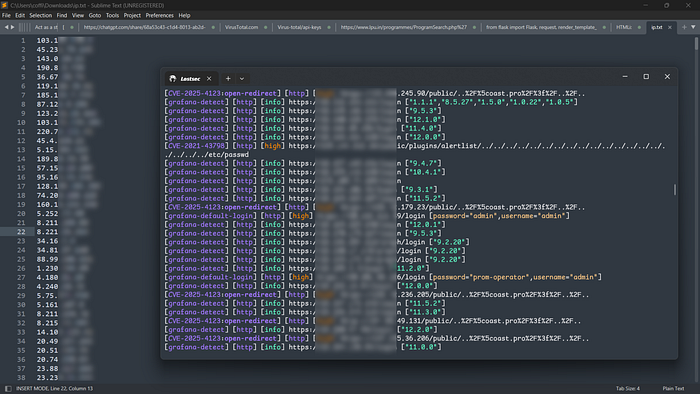
Method 2: Uncovering What's Hidden in Plain Sight
Developers often disable form inputs, buttons or hide entire sections of a page, thinking they are secure. This script helps you bypass those client-side restrictions.
javascript:(function(){document.querySelectorAll('[disabled],[readonly]').forEach(el=>{el.removeAttribute('disabled');el.removeAttribute('readonly');});document.querySelectorAll('[style*="display: none"]').forEach(el=>{el.style.display='block';});document.querySelectorAll('[style*="pointer-events: none"]').forEach(el=>{el.style.pointerEvents='auto';el.style.opacity='1';});alert('Disabled, readonly, and hidden elements are now active!');})();I've integrated a handy script into my Lost Uncover tool that automatically finds and modifies these elements on a webpage:
javascript:(function(){if(document.getElementById('lostsec-scanner'))return;let e=!1,t=[],n=document.createElement('div');n.id='lostsec-scanner',n.style='position:fixed;bottom:0;left:0;width:100%;height:350px;background:#181818;color:#00bcd4;z-index:999999;padding:20px;font-family:monospace;box-shadow:0 -2px 10px rgba(0,0,0,0.7);border-top:2px solid #00bcd4;overflow:hidden;';let o=document.createElement('div');o.style='position:absolute;top:0;left:0;width:100%;height:10px;background:#222;cursor:ns-resize;',n.appendChild(o);let i=!1,a=0,l=0;o.addEventListener('mousedown',r=>{i=!0,a=r.clientY,l=n.offsetHeight,r.preventDefault()});function d(r){if(i){let d=l-(r.clientY-a);d=Math.max(200,Math.min(d,window.innerHeight*.9)),n.style.height=d+'px';let s=document.getElementById('results-wrapper');s&&(s.style.maxHeight=d-140+'px')}}function c(){i=!1}document.addEventListener('mousemove',d),document.addEventListener('mouseup',c);let s=document.createElement('div');s.textContent='❌',s.style='position:absolute;top:10px;right:20px;font-size:18px;color:#ff4081;cursor:pointer;';function u(){e=!0,document.removeEventListener('mousemove',d),document.removeEventListener('mouseup',c),document.removeEventListener('keydown',f),n.remove(),t.forEach(e=>e.abort())}s.onclick=u,n.appendChild(s);let m=document.createElement('h3');m.textContent='🔍 Lostsec Uncover',m.style='margin:10px 0;color:#00bcd4;',n.appendChild(m);let v=document.createElement('input');v.placeholder='Search URLs...',v.style='width:100%;padding:6px;margin-bottom:10px;border-radius:4px;border:none;font-size:14px;outline:none;background:#222;color:#00bcd4;',n.appendChild(v);let y=document.createElement('div');y.style='margin-bottom:10px;display:flex;gap:10px;flex-wrap:wrap;';let h=document.createElement('button');h.textContent='📋 Copy All',h.style='padding:5px 10px;background:#222;color:#00bcd4;border:none;border-radius:3px;cursor:pointer;';let g=document.createElement('button');g.textContent='⬇%EF%B8%8F Export .txt',g.style='padding:5px 10px;background:#222;color:#00bcd4;border:none;border-radius:3px;cursor:pointer;';let z=document.createElement('button');z.textContent='🪄 Unhide Elements',z.style='padding:5px 10px;background:#222;color:#00bcd4;border:none;border-radius:3px;cursor:pointer;';z.onclick=()=>{document.querySelectorAll('[disabled],[readonly]').forEach(el=>{el.removeAttribute('disabled');el.removeAttribute('readonly');});document.querySelectorAll('[style*="display: none"],.hidden').forEach(el=>{el.style.display='block';});document.querySelectorAll('[style*="pointer-events: none"],.grayed').forEach(el=>{el.style.pointerEvents='auto';el.style.opacity='1';});alert('✅ Disabled, readonly, and hidden elements are now active!');};let p=document.createElement('label');p.style='display:flex;align-items:center;gap:5px;color:#00bcd4;font-size:14px;cursor:pointer;';let b=document.createElement('input');b.type='checkbox',p.appendChild(b),p.appendChild(document.createTextNode('Domain only')),y.appendChild(h),y.appendChild(g),y.appendChild(z),y.appendChild(p),n.appendChild(y);let w=document.createElement('div');w.id='results',w.style='margin-top:10px;color:#00bcd4;';let k=document.createElement('div');k.id='results-wrapper',k.style='background:#222;padding:10px;border-radius:5px;max-height:180px;overflow:auto;margin-top:10px;',n.appendChild(w),n.appendChild(k),document.body.appendChild(n);let x=new URL(window.location.href).hostname;function f(r){'Escape'===r.key&&u()}document.addEventListener('keydown',f);let totalScripts=0,processedScripts=0,foundSet=new Set,domUrls=[];function updateProgress(){w.innerHTML=%60<div style="margin:10px 0;color:#00bcd4">Scanning... (${processedScripts}/${totalScripts} scripts processed)</div>%60}function updateResults(){let arr=[...new Set([...domUrls,...foundSet])];C=arr,T(arr)}async function scanExternalScripts(){let scripts=document.getElementsByTagName('script');totalScripts=Array.from(scripts).filter(s=>s.src).length,processedScripts=0;let regex=/["'%60]\/[a-zA-Z0-9_?&=\/\-\#\.]*(?=["'%60])/g,promises=[];for(let s of scripts)if(s.src){let ctrl=new AbortController;t.push(ctrl),promises.push(fetch(s.src,{signal:ctrl.signal}).then(r=>r.text()).then(text=>{if(e)return;let matches=text.matchAll(regex);for(let m of matches)foundSet.add(m[0]);processedScripts++,updateProgress(),updateResults()}).catch(err=>{processedScripts++,updateProgress();'AbortError'!==err.name&&console.error(err)}))}await Promise.all(promises)}function L(){let e=new Set;document.querySelectorAll('a,script,img,link,form').forEach(t=>{t.href&&e.add(t.href),t.src&&e.add(t.src),t.action&&e.add(t.action)});let n=document.documentElement.innerHTML,o=/(?:url\(|href=|src=|action=|url:|endpoint:|path:|route:)\s*["']?([^"')\s>]+)(?=["'>\s])/gi,i;for(;null!==(i=o.exec(n));)i[1]&&!i[1].startsWith('data:')&&e.add(i[1]);(n.match(/"[^"]*"|'[^']*'/g)||[]).forEach(t=>{let n=/(?:\/[a-zA-Z0-9_-]+)+(?:\.[a-zA-Z0-9]+)?/g,o=t.match(n)||[];o.forEach(t=>e.add(t))}),performance.getEntriesByType('resource').forEach(t=>e.add(t.name));return Array.from(e).sort()}function T(n){k.innerHTML='';let o=n.filter(t=>{if(b.checked&&!t.includes(x))return!1;let n=v.value.toLowerCase();return!(n&&!t.toLowerCase().includes(n))});o.forEach(e=>{let t=document.createElement('div');t.style='color:#fff;margin:4px 0;padding:5px;background:#333;border-radius:3px;word-break:break-all;',t.textContent=e,k.appendChild(t)})}function U(e){return e.filter(t=>{if(b.checked&&!t.includes(x))return!1;let n=v.value.toLowerCase();return!(n&&!t.toLowerCase().includes(n))})}let C=[];v.addEventListener('input',()=>T(C)),b.addEventListener('change',()=>T(C)),h.addEventListener('click',()=>{let e=U(C);navigator.clipboard.writeText(e.join('\n')).then(()=>alert('✅ URLs copied!'))}),g.addEventListener('click',()=>{let e=U(C),t=new Blob([e.join('\n')]),n=document.createElement('a');n.href=URL.createObjectURL(t),n.download='lostsec_urls.txt',n.click()}),function init(){w.textContent='Scanning...';domUrls=L(),updateResults(),scanExternalScripts().then(()=>{if(e)return;w.innerHTML=%60<div style="margin:10px 0;color:#00bcd4">✅ Scan complete! Found ${C.length} unique URLs & Endpoints on ${x}</div>%60,T(C)}).catch(n=>{if(e)return;console.error(n),w.textContent='❌ Error during scan. Check console for details.'})}();})();You can use this HTML file to test the script. Simply open the file and use the 'Lost Uncover → Unhide Element' option
<!DOCTYPE html>
<html lang="en">
<head>
  <meta charset="UTF-8" />
  <title>Bookmarklet Test Page</title>
  <style>
    body {
      background-color: black;
      color: #00ff88;
      font-family: monospace;
      padding: 20px;
    }
    input, button {
      font-family: monospace;
      margin-top: 5px;
      margin-bottom: 20px;
      padding: 5px;
    }
    .hidden {
      display: none;
    }
    .grayed {
      pointer-events: none;
      opacity: 0.4;
    }
  </style>
</head>
<body>
  <h1>Bookmarklet Test Page</h1>

  <h2>Disabled Input</h2>
  <label>Email (Disabled):<br>
    <input type="text" value="you@nowhere.com123" disabled>
  </label>

  <h2>Readonly Input</h2>
  <label>Username (Readonly):<br>
    <input type="text" value="readonly_user123" readonly>
  </label>

  <h2>Hidden Button</h2>
  <button class="hidden" id="secret-btn">Secret Admin Button</button>

  <h2>Grayed-Out Section</h2>
  <div class="grayed">Premium Content</div>
</body>
</html>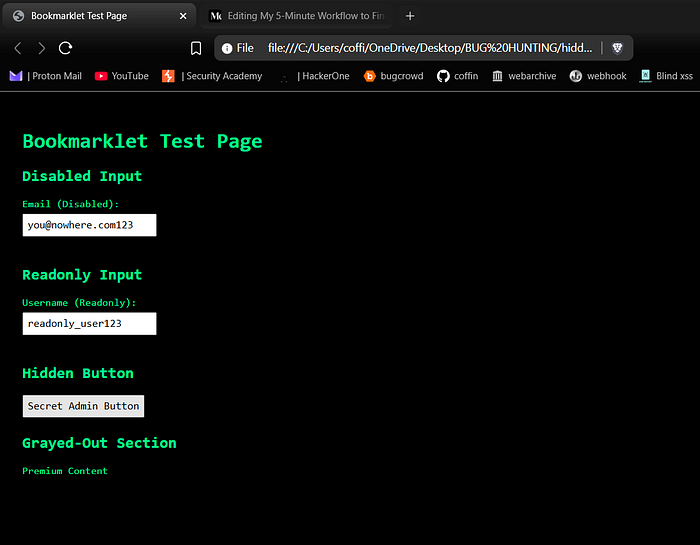
As you can see, after clicking 'Unhide Element,' it reveal Disabled Inputs, Readonly Inputs, Hidden Buttons, Grayed-Out Sections and similar elements.
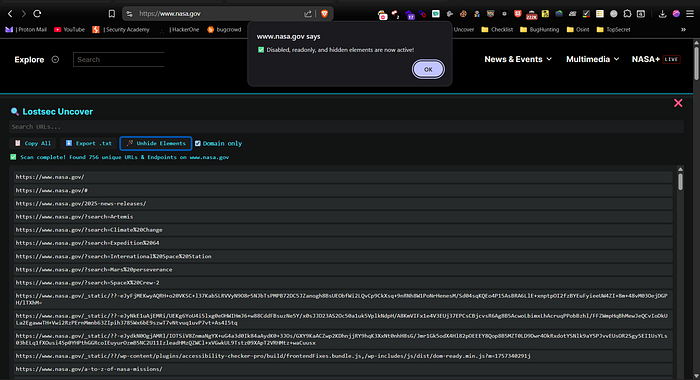
You can also use this script to quickly scan any website for URLs, endpoints, and hidden resources directly from your browser.
In short, here's what it does:
- Opens a floating, resizable panel at the bottom of the page.
- Collects URLs from the page including <a>, <script>, <img>, <link>, <form> tags, inline HTML, CSS url() paths, and browser resource performance entries.
- Scans external JavaScript files to find more endpoints using regex.
- Lets you search/filter URLs, copy all URLs to clipboard, or export them as a .txt file.
- Can unhide hidden or disabled elements on the page for testing purposes.
- Supports a domain-only filter to focus on internal links.
- Shows scan progress and total URLs found.
- Can be closed with Escape key or by clicking ❌, aborting ongoing fetches.
By re-enabling these elements, you can often access forgotten or administrative functionalities that are still active on the backend. It's amazing what you can find just by poking around in features that were meant to be hidden.
Method 3: My Automated Bug Hunting Toolkit: A Deep Dive into Each Tool
To really speed things up, I rely on a set of powerful scripts and tools that automate the most time-consuming parts of reconnaissance. Here's a look at the key players in my automation workflow.
AlienVault OTX: The Foundation for Mass URL Discovery
This is where my main automation begins. The first step is to get a complete map of the target's web presence, and for that, I use a script that queries AlienVault's Open Threat Exchange (OTX).
./alienvault.sh domain.com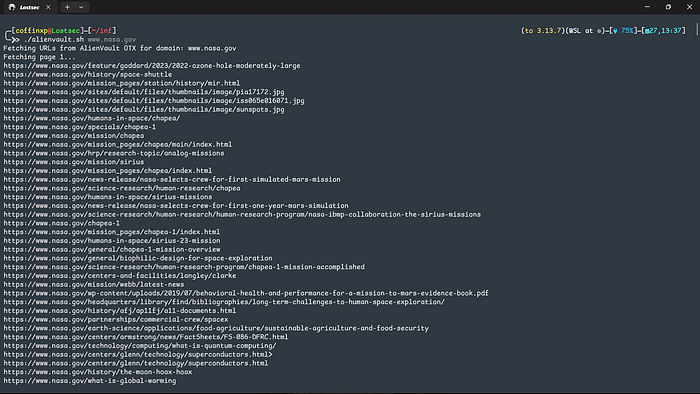
Its superpower is its thoroughness. It digs deep and fetches every known URL associated with a domain, crawling through pages until it has a massive list. Once I have this raw data, I refine it to find the most interesting targets:
- Generate the URL list using the AlienVault script.
- Filter for interesting parameters using gf patterns (like gf xss or gf sqli).
- Remove duplicates with a tool like uro.
The final command looks something like this, leaving me with a clean list of potentially vulnerable URLs ready for testing:
cat all_urls.txt | gf xss | uro > unique_xss_targets.txt
cat all_urls.txt | gf sqli | uro > unique_xss_targets.txt
cat all_urls.txt | gf idor | uro > unique_xss_targets.txt
cat all_urls.txt | gf ssrf | uro > unique_xss_targets.txt
cat all_urls.txt | gf redirect | uro > unique_xss_targets.txt
You can find all the gf patterns in my GitHub repository. Make sure to install the gf tool first before using them
LostFuzzer: Your Quick & Easy DAST Scanner
You can use my LostFuzzer script for a simple, direct approach. Provide a domain (or a list of domains) and it will automatically run a Nuclei DAST scan to find vulnerabilities. It's lightweight, easy to use, and delivers high-impact results with minimal effort. You Read more about this in my Medium article:
URLScan.io: Uncovering Hidden Subdomains and Endpoints
URLScan.io is another goldmine for reconnaissance, and using a script to automate queries is a huge time-saver. This tool is great for two main tasks:
- Finding Subdomains: You can run the script in "Subdomains" mode to get a list of all related subdomains. I often pipe this output directly to HTTPX to see which ones are live and what technology they're running.
- Discovering More URLs: In "URLs" mode, it fetches another unique set of URLs. You can add these to the list you got from AlienVault or scan them separately with Nuclei DAST.
python urlscan.py -d redbull.com --mode urls
python urlscan.py -d redbull.com --mode subdomains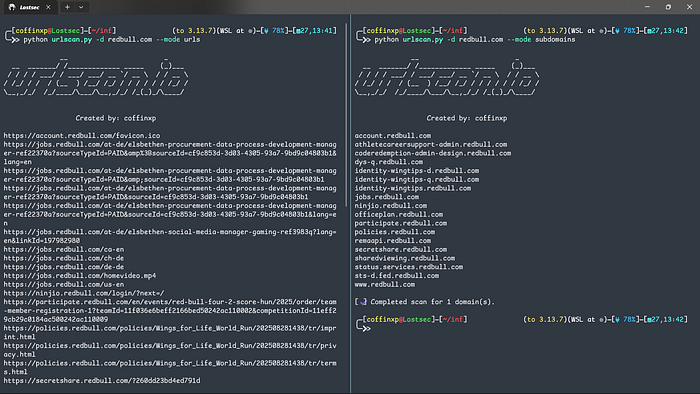
VirusTotal Script: Mining for Digital Gold
This is one of my secret weapons for finding the kind of sensitive information that other tools often miss. Using a script written by Orwa that queries VirusTotal, you can uncover some incredible findings.
Because VirusTotal analyzes files and URLs submitted by users worldwide, its database sometimes contains exposed secrets related to your target. I have personally used this script to find:
- Email and password combinations.
- Internal API keys.
- Password reset tokens and other sensitive links
It's always worth a quick check, you never know what secrets might be hiding in plain sight, also make sure to add your three different virustotal api keys in the given script.
./virustotal.sh domain.com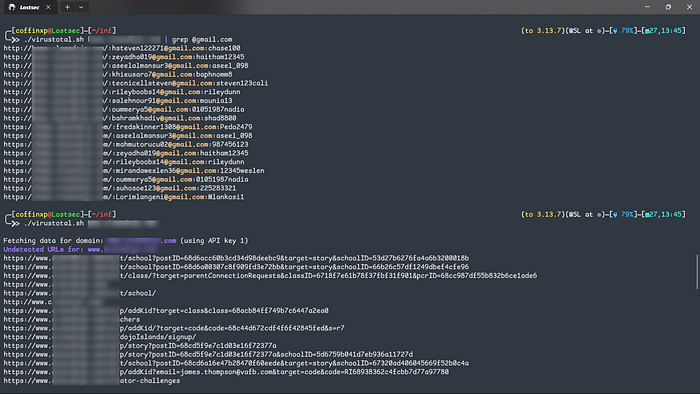
Waybackurls: The Engine of My Recon Workflow
This is my updated all‑in‑one URL‑gathering script, fast, flexible and integrates with other tools. It uses waybackurls as the core engine to pull historical URLs from sources like the Wayback Machine and Common Crawl. perfect for finding forgotten endpoints.
Here are its key features:
Usage: ./wayback.sh domain.com [-s] [-e] [-sc codes] [-scx codes]
Examples:
  ./wayback.sh example.com -s -sc 200
  ./wayback.sh example.com -sc 200,302,403
  ./wayback.sh example.com -scx 404,500
./wayback.sh example.com -e extensions only- Subdomain Support (-s): Provide this flag to include all subdomains in the search, which is perfect for wildcard scope programs.
- Status Code Filtering (-sc & -scx): You can filter for specific status codes (like -sc 200 to only get live pages) or exclude codes (like -scx 404 to remove dead links).
- Extension Filtering (-e): Use this flag to retrieve only URLs with specific file types or extensions listed in the script.
The best part is that it's built for one-liners. You can chain it directly with other tools:
./wayback.sh example.com -s -sc 200 | gf xss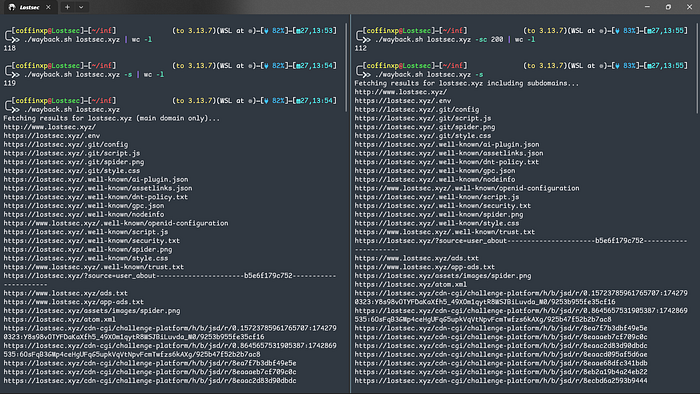
Gospider: fast crawling & JS harvesting
Here's another fast crawler I use for site mapping, JS analysis and endpoint discovery. Lightweight and perfect for one-liners with jsleaks, lazyegg, gf patterns and nuclei, it can generate and verify links from JavaScript using LinkFinder, detect AWS S3 buckets from page sources and extract subdomains or hidden URLs. It also pulls data from the Wayback Machine, Common Crawl, VirusTotal and AlienVault. giving a complete view of your target's exposed assets for a fast, powerful recon workflow.
Basic commands:
gospider -s https://example.com                      # Crawl the site and print discovered URLs/paths.
gospider -s https://example.com -a                   # Crawl the site and also gather URLs from 3rd-party sources
                                                      (Archive.org,CommonCrawl,VirusTotal,AlienVault).
gospider -s https://example.com -d 3                 # Crawl the site with recursion depth 3 (follow links up to 3 levels deep).
gospider -s https://example.com --subs               # Crawl the site and include discovered subdomains in the results.
gospider -s https://example.com --sitemap -d 2       # Try to parse sitemap.xml and crawl with max depth 2 (uses sitemap to find additional URLs).
gospider -s https://example.com -p http://127.0.0.1:8080  # Crawl the site but send requests through the specified HTTP proxy.
gospider -s https://example.com/upload/ -d 3 --whitelist "/upload/"  # Crawl only paths matching the whitelist "/upload/" up to depth 3 (limits scope).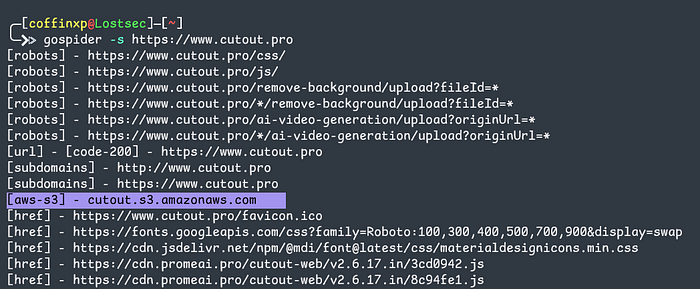
Pro JS One‑Liners for Hunting Secrets:
gospider -s https://example.com | grep -Eo 'https?://[^"'\''<>[:space:]]+' | sort -u
# Crawl domain, extract absolute URLs, then sort & dedupe.

gospider -s https://example.com -d 3 | grep '\.js$' | grep -Eo 'https?://[^"'\''<>[:space:]]+'
# Crawl to depth 3, keep .js URLs, extract absolute URLs.

gospider -s https://example.com | grep -Eo 'https?://[^"'\''<>[:space:]]+' | grep '\.js$' | jsleaks -s -k
# Find JS file URLs and scan them with jsleaks for possible secrets (jsleaks flags -s -k).

gospider -s https://example.com | grep -Eo 'https?://[^"'\''<>[:space:]]+' | grep '\.js$' | xargs -I{} bash -c 'echo -e "\ntarget : {}\n" && python lazyegg.py "{}" --js_urls --domains --ips --leaked_creds --local_storage'
# For each JS URL, print a header and run lazyegg to extract endpoints, domains, IPs, leaked creds and localStorage.

gospider -s https://example.com | grep -Eo 'https?://[^"'\''<>[:space:]]+' | grep '\.js$' | nuclei -t credentials-disclosure-all.yaml -c 30
# Feed discovered JS URLs into Nuclei using the credentials-disclosure-all template to hunt for exposed credentials/tokens.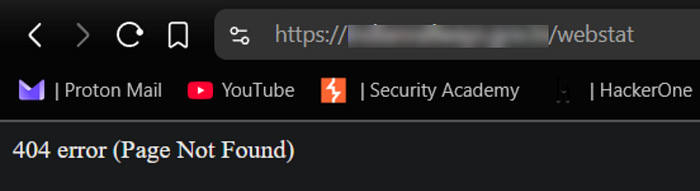
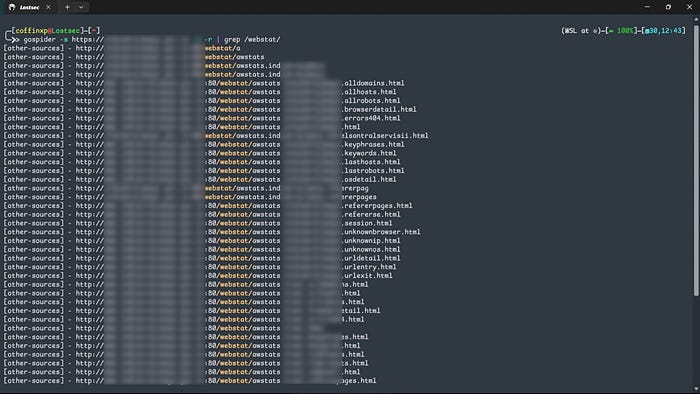
As the screenshot shows, the endpoint no longer exists on the live server, yet it still appears in other passive sources. That's why I use the passive source flag. it helps uncover 404s and archived endpoints that active scans often miss.
You can also watch this video where I showed the complete practicle of this method:
Conclusion
This is the exact workflow I use to find bugs on any website in under five minutes. With the right mix of Shodan searches, automation scripts and scanning tools, you'll uncover vulnerabilities faster than ever. Remember, the goal isn't just to find bugs. it's to report them responsibly and keep the internet a safer place.
Disclaimer
The content provided in this article is for educational and informational purposes only. Always ensure you have proper authorization before conducting security assessments. Use this information responsibly