

No bragging, let's get to the talk.
We often work with LLMs as third party applications. API keys are issued by Google, Claude, OpenAI and many other providers to access their LLMs.
Most of them are not free and only the 'pro' models can be accessed via API. But for developers, there are some free instances they give access and most of us are not aware of that.
Google AI Studio
Google AI Studio is a web-based tool that lets you build, test, and deploy AI applications using Google's generative models, including the powerful Gemini family.
The free tier of Google AI Studio and the Gemini API is a great starting point, offering a number of features without any cost for a good amount of usage, making it perfect for rapid prototyping, learning, and personal projects.
Step-by-Step Guide to Getting Your API Key
1. Visit: Open your web browser and go to the Google AI Studio website.
2. Sign In: Use your regular Google Account to sign in.
3. Find the API Key Section: Once you are logged in, look for a button or a link that says Get API key. You might also see a key icon. Click on it.
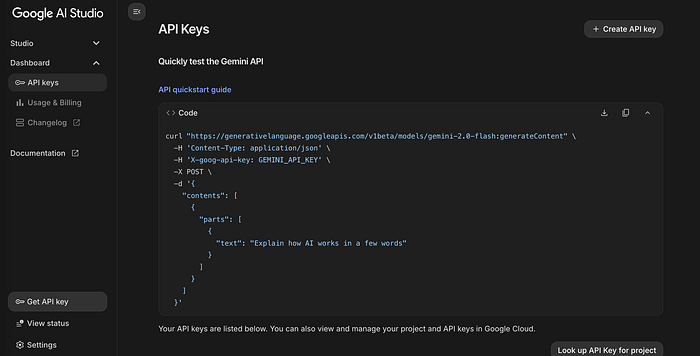
4. Agree to the Terms: If this is your first time, a pop-up window will appear asking you to accept Google's terms of service for the Generative AI API. Read them over and check the box to agree, then click Continue.
5. Create the Key: You will now see a page with a big button that says Create API key. You may be asked if you want to create the key for a new project or an existing one. For a simple start, choose to create a key in a new project. Google will automatically handle the setup for you.
6. Copy and Save Your Key: A new API key will be generated and displayed on your screen. Copy the key and save it somewhere safe.
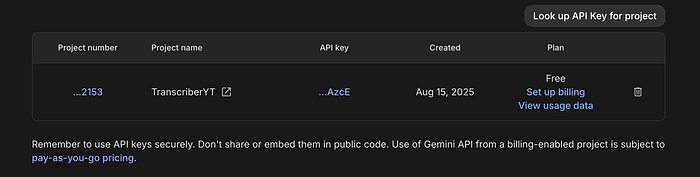
Key Features of the Free Tier:
- Access to a range of models: You can access several models from the Gemini family, including the more advanced Gemini 2.5 Pro and the highly efficient Gemini 2.5 Flash. The free tier also provides access to models like Gemma, an open model from Google.
- Generous usage limits: While not unlimited, the free tier offers a significant number of requests per minute (RPM) and tokens per day (TPD), which are ample for most development and testing scenarios.
- Multimodal capabilities: The free tier supports multimodal inputs. This means you can interact with models by providing both text and images, allowing you to build applications that can, for instance, answer questions about an uploaded image.
- Parameter tuning: You can adjust various parameters like
temperature,top-k,top-p, andmax output tokensto fine-tune the model's behavior and get the desired response characteristics for your specific use case. This gives developers a level of control that is often not available in consumer-facing AI products. - Model tuning (fine-tuning): The free tier even allows you to fine-tune some models, such as Gemini 2.5 Flash, at no cost.
OpenRouter
OpenRouter is a unified API gateway that provides access to a wide range of AI models from various providers, all through a single API. This simplifies the process for developers and users who want to switch between different models without managing multiple accounts and keys.
Using Free Models Directly from the Website
While OpenRouter is primarily an API platform, you can use some of the free models directly from their website's chat interface.
Visit the OpenRouter Website: Go to the OpenRouter website.
Sign In: Click on "Sign in" to log in or create a new account.
Explore Models: Navigate to the "Models" section of the site to see a list of available models.
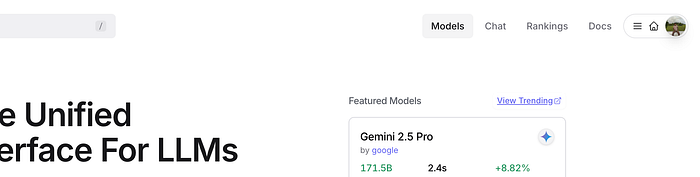
Filter for Free Models: Many models have a price listed per million tokens. Look for models that have "$0/M input $0/M output" listed. You can also filter the model list by prompt pricing.

Start a Chat: Some free models, like the ones with a "chat" or "instruct" designation, can be used directly in the chat interface on the OpenRouter site for free, up to certain rate limits.

Keep in mind that free models often have rate limits, such as 200 requests per day, so they are best for testing and personal use rather than heavy-duty applications.
Getting and Using an OpenRouter API Key
An API key is essential for using OpenRouter's models in your own applications or with third-party tools.
Step 1: Create an Account If you haven't already, sign up for a free account on the OpenRouter website.
Step 2: Navigate to the API Keys Page Once logged in, click on your profile picture or username in the top right corner and select "Keys" from the dropdown menu.

Step 3: Generate a New API Key Click the "Create Key" button. You will be prompted to give the key a name for easy tracking. You can also set a credit limit for the key to prevent unexpected charges if you plan to use paid models. For free models, you can leave this blank.
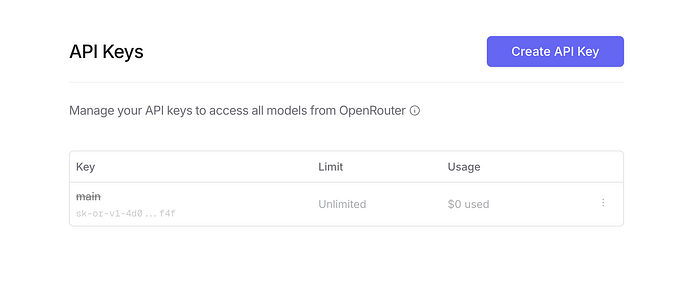
Step 4: Copy and Secure Your Key After you click "Create," the API key will be displayed. This is the only time you will be able to see the full key.
Step 5: Use Your API Key You can use the API key in a variety of ways, typically by setting it as an Authorization header in your API requests. The OpenRouter API is designed to be compatible with the OpenAI SDK, which makes it easy to integrate into existing applications.
Here is a basic example of how to use the key with the OpenAI SDK in Python:
from openai import OpenAI
from os import getenv

client = OpenAI(
  base_url="https://openrouter.ai/api/v1",
  api_key=getenv("OPENROUTER_API_KEY"), # or replace with your key as a string
)
completion = client.chat.completions.create(
  model="<MODEL_NAME_HERE>", # e.g., "deepseek/deepseek-r1-distill-llama-70b:free"
  messages=[
    {
      "role": "user",
      "content": "What is the meaning of life?",
    }
  ]
)
print(completion.choices[0].message.content)
Note on Free Models in the API: When using a free model via the API, the model ID will often end with :free. You can find the list of available free models on the OpenRouter website.
Happy prompting! If you're interested in tips like this, follow me and get in touch.
A message from our Founder
Hey, Sunil here. I wanted to take a moment to thank you for reading until the end and for being a part of this community.
Did you know that our team run these publications as a volunteer effort to over 3.5m monthly readers? We don't receive any funding, we do this to support the community. ❤️
If you want to show some love, please take a moment to follow me on LinkedIn, TikTok, Instagram. You can also subscribe to our weekly newsletter.
And before you go, don't forget to clap and follow the writer️!